Zennio Thermostat: 2.2. Thermostat n
Once the thermostat is enabled, the menu on the left will include a set of tabs intended for the configuration of the related parameters.
2.2.1. Main Configuration
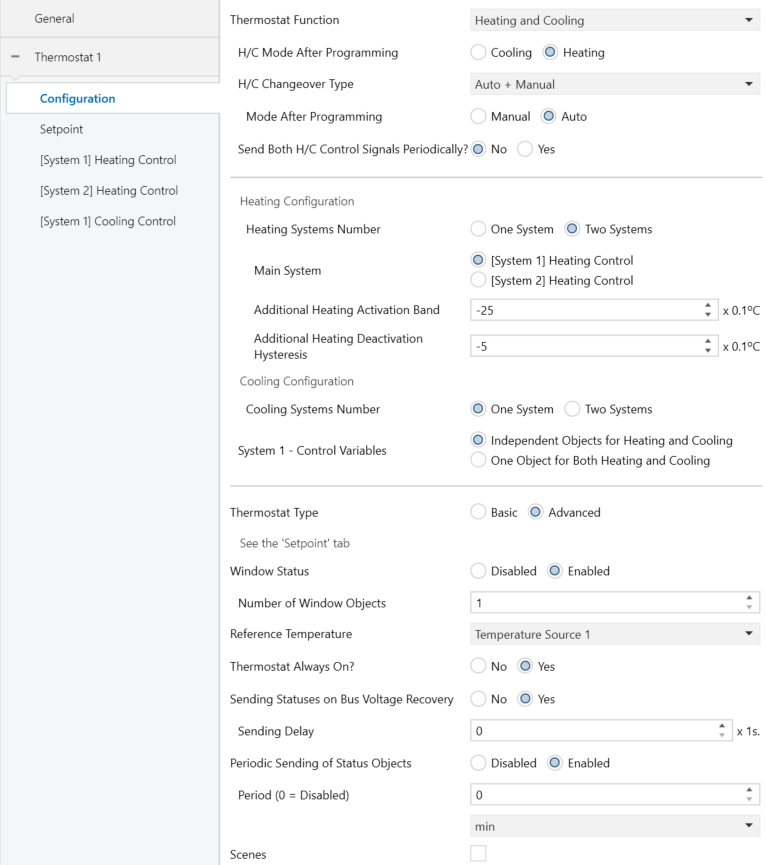
- Thermostat Function [Heating / Cooling / Heating and Cooling]: It allows the definition of which simplified operating mode(s) will be available after programming. Depending on the selection, a new tab will appear in the left-hand menu for each of the two simplified modes “[System x] Heating Control” and “[System x] Cooling Control”. Refer to sections 2.2.3 and 2.2.4 for further details on these tabs.
If the option Heating and Cooling has been enabled, additional parameters will be displayed:
- H/C Mode After Programming [Cooling / Heating]: defines which simplified operating mode will be activated after an ETS download.
- H/C Changeover Type [Manual / Auto / Auto + Manual] : Grants or denies the thermostat the responsibility for switching between the simplified modes (Heating / Cooling), according to the reference temperature and the thermostat’s operating setpoint temperature. Depending on the parameter selected, different communication objects will be available:
- Manual: A binary communication object, “[Tx] Simplified Mode”, is available to receive external commands for switching between simplified modes. The simplified cooling mode will be activated when a value of “0” is received, and the simplified heating mode when a value of “1” is received. In addition, a binary status communication object, “[Tx] Simplified Mode (status)”, is also available to indicate the current simplified mode: it will have the value “0” when the simplified mode is Cooling, and “1” when it is Heating.
- Auto: A single binary status communication object, “[Tx] Simplified Mode (status)”, is available, operating in the same way as described above.
- Auto + Manual: In this case, in addition to the previously mentioned objects, a new 1-byte enumerated control communication object will be available. Through this object, it will be possible to modify at runtime whether the change between heating and cooling modes is automatic (enabled upon receiving a “0”) or manual (enabled upon receiving a “1” for the simplified cooling mode or a “2” for the simplified heating mode). Furthermore, when this type of special mode switching is selected, the following parameter will appear:
- Mode After Programming [Manual / Auto]: Defines the type of simplified mode change to be applied after programming.
- Send Both H/C Control Signals Periodically [No / Yes]: sets whether to send periodically the control variables of both, the Heating and the Cooling simplified modes (and, if enabled, the objects of the additional system; see section 2.2.3 and 2.2.4), or whether to send only the variable of the currently active mode (note that the control variable of the currently inactive mode will be zero). The sending period should be configured for each mode (Heating/Cooling) from its specific parameter tab.
- Heating Systems Number [One System / Two Systems]: sets whether to use 1 or 2 systems for heating simplified mode. If Two Systems is selected, the following parameters appear:
- Main System [[System 1] Heating Control / [System 2] Heating Control]: sets which of the two systems will act as the main for heating simplified mode after ETS download (the unchecked one will act as the additional).
Two new communication objects will also appear, of 1 bit and 1 byte respectively. The first one, a 1-bit object (“[Tx] Force Secondary System (Heating)”), allows the activation of the system configured as the auxiliary heating system, regardless of the operating conditions parameterised at runtime. The second one, a 1-byte object (“[Tx] System Selector (Heating)”), makes it possible, at runtime, to define which heating system will operate as the main or auxiliary one, thus allowing the priority between systems S1 and S2 to be determined according to the desired configuration:
- 0 = S1 (Main) / S2 (Additional): System S1 acts as the main heating source, while system S2 operates as the auxiliary or booster system.
- 1 = Only S1: Only system S1 will be available, while system S2 will remain inactive.
- 2 = Only S2: Only system S2 will be available, while system S1 will remain inactive.
- 3 = S2 (Main) / S1 (Additional): System S1 acts as the main heating source, while system S2 operates as the auxiliary or booster system.
- Additional Heating Activation Band [-100…-25…-5] [x 0.1 ºC]: difference between the setpoint and the current temperature for activation of the additional climate control.
- Additional Heating Deactivation Hysteresis [-20…-5…-1] [x 0.1 ºC]: temperature increase relative to the additional heat activation band to deactivate the additional climate control.
- Main System [[System 1] Heating Control / [System 2] Heating Control]: sets which of the two systems will act as the main for heating simplified mode after ETS download (the unchecked one will act as the additional).
Note
The value corresponding to the hysteresis must be higher than the value of the activation band for the heating mode (see Figure 6 in section 1.2.4). Otherwise, the additional system may remain on when the main one has been turned off.
- Cooling Systems Number [One System / Two Systems]: sets whether to use 1 or 2 systems for cooling simplified mode. If Two Systems is selected, the following parameters appear:
- Main System [[System 1] Cooling Control / [System 2] Cooling Control]: sets which of the two systems will act as the main for cooling simplified mode after ETS download (the unchecked one will act as the additional).
Two new communication objects will also appear, of 1 bit and 1 byte respectively. The first one, a 1-bit object (“[Tx] Force Secondary System (Cooling)”), allows the activation of the system configured as the auxiliary cooling system, regardless of the operating conditions parameterised at runtime. The second one, a 1-byte object (“[Tx] System Selector (Cooling)”), makes it possible, at runtime, to define which cooling system will operate as the main or auxiliary one, thus allowing the priority between systems S1 and S2 to be determined according to the desired configuration:
- 0 = S1 (Main) / S2 (Additional): System S1 acts as the main cooling source, while system S2 operates as the auxiliary or booster system.
- 1 = Only S1: Only system S1 will be available, while system S2 will remain inactive.
- 2 = Only S2: Only system S2 will be available, while system S1 will remain inactive.
- 3 = S2 (Main) / S1 (Additional): System S1 acts as the main cooling source, while system S2 operates as the auxiliary or booster system.
- Additional Cooling Activation Band [5…25…100] [x 0.1 ºC]: difference between the current temperature and the setpoint for activation of the additional climate control.
- Additional Cooling Deactivation Hysteresis [1…5…20] [x 0.1 ºC]: temperature drop relative to the additional cool activation band to deactivate the additional climate control.
- Main System [[System 1] Cooling Control / [System 2] Cooling Control]: sets which of the two systems will act as the main for cooling simplified mode after ETS download (the unchecked one will act as the additional).
Note
The value corresponding to the hysteresis must be lower than the value of the activation band for the cooling mode (see Figure 5 in section 1.2.4). Otherwise, the additional system may remain on when the main one has been turned off.
- System 1 - Control Variables [Independent Objects for Heating and Cooling / One Object for Both Heating and Cooling]: this parameter only appears if the option "Heating and cooling" has been selected in Thermostat Function. Determines whether System 1 is controlled with a single object for heating and cooling or whether each mode has its own independent objects.
- System 2 - Control variables [Independent Objects for Heating and Cooling / One Object for Both Heating and Cooling]: this parameter only appears if the "Heat and Cool" option has been selected in Thermostat Function and "Two systems" option has been configured in both modes. Determines whether System 2 is controlled with a single object for heating and cooling or whether each mode has its own independent objects.
Notes
- If the "One Object for Both Heating and Cooling" option is selected, the control method must be the same for both modes.
- Combining "One Object for Both Heating and Cooling" with Send Both H/C Control Signals Periodically will ignore the latter and only send the value of the variable corresponding to the current mode.
- Thermostat Type [Basic / Advanced]: sets the desired configuration pattern for the special modes and their respective temperature setpoints (see section 1.2.5). In the Advanced configuration, an additional tab (named Setpoint; see section 2.2.2) will show up.
If configured as Basic with H/C Automatic Changeover between the Cooling and Heating simplified modes active, two parameters will be shown in relation to comfort dead band, which are analogous to those of the advanced thermostat (see section 2.2.2.2). And also, the following parameter:
- Initial Setpoint [-20…22…100] [x 1 ºC]: sets the initial setpoint for Comfort special mode after an ETS download (see 1.2.5.1).
- Window Status [Disabled / Enabled]: enables or disables the “[Tx] Window Status (Input)” one-bit object, which will make the thermostat switch to Protection special mode if the value “1” is received through it. If enabled, another parameter, Number of Window Objects, will be displayed, allowing the configuration of the number of available communication objects (up to 4 independent objects). See section 1.2.6.
- Reference Temperature: determines the source of the reference temperature. This may be the value of a sole two-byte communication object (“[Tx] Temperature Source”), or a combination of two two-byte objects (“[Tx] Temperature Source 1” and “[Tx] Temperature Source 2”) with a configurable proportion. These objects should be themselves linked to those that report the temperature measurement (e.g., the object of the internal temperature probe). See section 1.2.1.
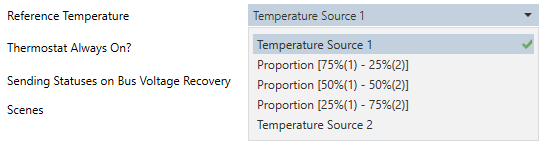
In case of selecting a proportion of the two objects, a two-byte object named “[Tx] Effective Temperature” will be transmitted whenever the value of the temperature resulting from such combination changes.
- Thermostat Always On? [No / Yes]: sets whether the thermostat should remain always on or, on the contrary, whether it should be possible to turn it on / off externally.

In case of selecting No, two new binary communication objects (“[Tx] On/Off” and “[Tx] On/Off (status)”) will show in ETS, as well as the following parameters:
- Start-up Setting (on Bus Voltage Recovery) [Last (Before Bus Failure) / OFF / ON]: sets the start-up state of the thermostat (after a power failure or an ETS download. Last will be considered as Off on the very first start-up (after a download).
- Automatic ON when a Special Mode Arrives [Disabled / Enabled]: enabling this option will make the thermostat automatically switch on (if off) whenever a mode order is received (even if it does not imply a changeover of the special mode, or if the object is not changing the value it already had) through “[Tx] Special Mode” (one byte) or “[Tx] Special Mode: mode name” (one bit), as well as when receiving a “1” through the “[Tx] Window Status (input)” or the “[Tx] Comfort Prolongation” objects.
- Sending Statuses on Bus Voltage Recovery [No / Yes]: sets whether the device should send the KNX bus the thermostat state objects after the start-up. Sending their updated value is also possible after a certain delay [0…255] [x 1s].

Even if a delay time has been set, the following states are sent to the bus immediately after the bus voltage has been restored:
- Setpoint (Status)
- On/Off (Status)
- Control variables
- Periodic Sending of Status Objects [Disabled / Enabled]: Allows enabling the periodic sending of the following status objects: “[Tx] Special Mode”, “[Tx] Setpoint”, “[Tx] Simplified Mode”, “[Tx] Mode”, and “[Tx] On/Off”. If enabled, the periodic resend time can be configured:
- Period (0 = Disabled) [0…255] [s / min] / [0…18] [h]]: Defines the time interval at which the status objects will be sent to the bus.
Note
This parameter will only be visible if Periodic Sending of Status Objects is enabled.
- Scenes [Disabled / Enabled]: enables the Scenes function of the thermostat, and the corresponding specific tab in the menu on the left (see 2.2.5).
2.2.2. Setpoint
This window is only available if the thermostat type has been set to Advanced. It contains the parameters related to the setpoints of the different special modes and to the desired control type (absolute or relative). Reading section 1.2.5 is highly encouraged for a better understanding of these parameters.
With independence of how this screen is configured, objects “[Tx] Special Mode” and “[Tx] Special Mode (Status)” (one-byte size each) will permit selecting the desired special mode and checking which of them is currently active, respectively, according to the following table.
| Value | Special Mode |
|---|---|
| 1 | Comfort |
| 2 | Standby |
| 3 | Economy |
| 4 | Protection |
The parameters included in this tab are described next.
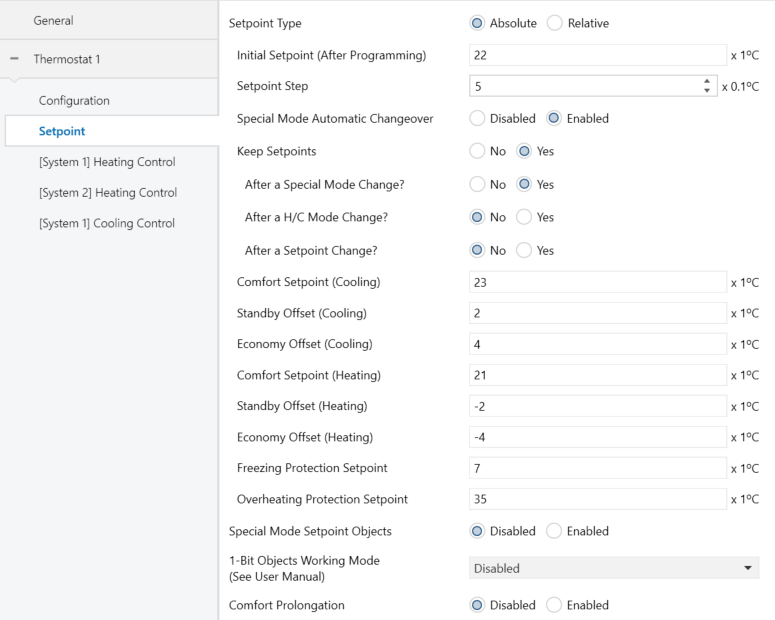
Note
The figures shown next contain parameters related to both, the Heating and the Cooling simplified modes. If only one of the two modes have been enabled, ETS will hide the parameters of the other simplified mode.
- Setpoint Type [Absolute / Relative]: see sections 1.2.5.2.1 and 1.2.5.2.2. The specific parameters of one case and another will be detailed in sections 2.2.2.1 and 2.2.2.2, respectively.
- Special Mode Setpoint Objects [Disabled / Enabled]: If enabled, an independent setpoint communication object will be available for each special mode (except for Protection special mode).
Note
It is the responsibility of the integrator to ensure the functional consistency of the defined setpoints, maintaining the logical structure of the modes and avoiding any overlap or interference between the setpoints of different special modes.
- 1-bit Objects Working Mode [Trigger / Switch / Disabled]: enables or disables the special mode selection once-bit objects and sets the desired response type. These objects are: “[Tx] Special Mode: Comfort”, “[Tx] Special Mode: Standby”, “[Tx] Special Mode: Economy” and “[Tx] Special Mode: Protection”.
In case of opting for Switch, an additional parameter will show up (Default Mode) for the selection of the special mode to be adopted by the thermostat when all the binary objects have the value “0”. This option should not be confused with the selection of an initial mode for the thermostat, which is determined by the value set for Initial Setpoint (After Programming) (2.2.2.2) or for Initial Mode (After Programming) (2.2.2.1).

In case of selecting Disabled, switching the special mode will only be possible through the one-byte “[Tx] Special Mode” object.
- Comfort Prolongation [Disabled / Enabled]: enables or disables Comfort Prolongation function (see section 1.2.6) and shows/hides the “[Tx] Comfort Prolongation” one-bit communication object, which will make the thermostat –on the reception of the value “1”– switch to Comfort special mode, returning to the previous mode once the period defined in Comfort Prolongation Time [[10…30…255] [min] / [1…255] [h]] ends. Note that receiving the value “1” multiple times will reset the time count successively.
Note
If the value “1” is received through the “[Tx] Window Status (input)” object while Comfort Prolongation time is counting, the thermostat will trigger Protection special mode until this object acquires the value “0” again, after which the thermostat will in any case consider Comfort Prolongation time as expired, and will therefore adopt the corresponding special mode.

2.2.2.1. Absolute Setpoints
If Setpoint Working Mode is set to Absolute Setpoints, some specific parameters are also shown, as in Figure 14.
- Initial Setpoint (after programming) [-20…22…100] [x 1 ºC]: sets the desired setpoint temperature to be adopted by the thermostat initially, i.e., after an ETS download. This value will itself determine the special mode that will be assumed as active when the device starts up.
The value of the setpoint will be modifiable any time through the “[Tx] Setpoint” two-byte object, whose value will as well determine when the thermostat should switch the current mode. Object “[Tx] Setpoint (Status)” can be read to obtain the current setpoint value.
Another one-bit object (“[Tx] Setpoint Reset”) is provided so that when it receives the value “1”, the current setpoint temperature will be reset to its original value, as parameterized in ETS for the currently active special mode.
Note
For absolute setpoints it is not possible to parameterise the initial special mode, as this will depend on the simplified mode and the initial setpoint.
- Setpoint Step [1…5…100] [x 0.1 ºC]: sets the increase/decrease in ºC that will be applied to the setpoint when the value ‘0’ or ‘1’ is received through the object "[Tx] Setpoint Step". This increase can have a value between 0.1 ºC and 10 ºC.
- Special Mode Automatic Changeover [Disabled / Enabled]: If disabled, this option prevents the special mode from changing automatically when the setpoint defined by the user exceeds, either above or below, the parameterised setpoint value for that mode. In this case, when the automatic special mode change is disabled, the Keep Setpoints parameter will be locked with its value set to No, in order to prevent the setpoints from being modified inconsistently, which could otherwise result in improper operation of the special mode logic.
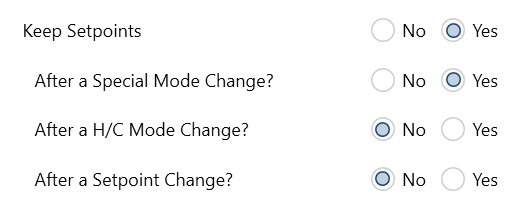
- Keep Setpoints [No / Yes]: enables or disables the option to store the current setpoint, as described in section 1.2.5.2.1. When enabled, three parameters are shown to separately select the vents upon which the setpoint will be stored: After a Special Mode Change, After an H/C Mode Change and After a Setpoint Change.
- Comfort Setpoint (Cooling) [-20…23…100] [x 1 ºC] / Comfort Setpoint (Heating) [-20…21…100] [x 1 ºC]: sets the initial setpoint temperature for Comfort special mode, respectively under Cooling and under Heating.
Important
Note: to ensure a proper automatic commutation between the Cooling and Heating simplified modes, the setpoint for Comfort (Cooling) needs to be greater than that for Comfort (Heating), and there must be at least a separation of 2 ºC between both.
- Standby Offset (Cooling) [0…2…10] [x 1 ºC] / Standby Offset (Heating) [-10…-2…0] [x 1 ºC]: sets the initial setpoint temperature for Standby special mode, respectively under Cooling and under Heating, which is here expressed as a certain increment or decrement with respect to the value set for Comfort special mode.
Example: Standby Offset.
- Suppose a setpoint temperature that has been configured to have an initial value of 23 ºC for Comfort (Cooling) and of 21 ºC for Comfort (Heating). In such case, if a setpoint of 25 ºC is required for Standby (Cooling) and of 18.5 ºC for Standby (Heating), it will be necessary to set offset values of 2 ºC and of -2,5 ºC, respectively.
- Economy Offset (Cooling) [0…4…10] [x 1 ºC]/ Economy Offset (Heating) [-10…-4…0] [x 1 ºC]: sets the initial setpoint temperature for Economy special mode, respectively under Cooling and under Heating. The configuration is analogous to that of the above parameter.
- Freezing Protection Setpoint [-10…7…15] [x 1 ºC]: sets the initial setpoint for Protection special mode under the Heating simplified mode.
- Overheating Protection Setpoint [25…35…120] [x 1 ºC]: sets the initial setpoint for Protection special mode under the Cooling simplified mode.
The remaining parameters of this window were already explained in section 2.2.2, as they are common to both Absolute and Relative Setpoints.
2.2.2.2. Relative Setpoints
If Setpoint Working Mode is set to “Relative Setpoints”, some specific parameters are also shown, as the following figure illustrates.
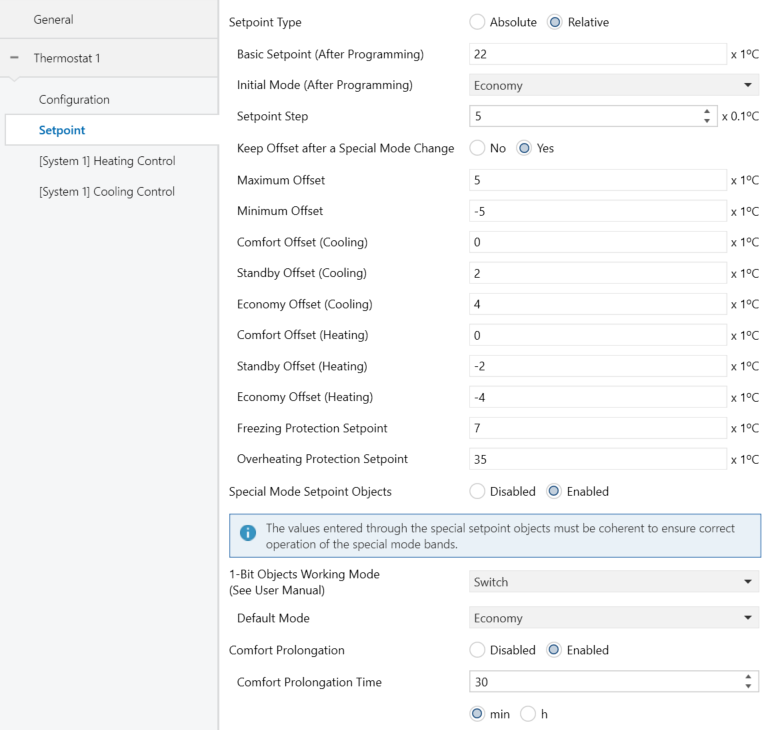
Through the Relative Setpoints method, the integrator is required to set a base temperature value, and a positive or negative offset for each special mode, which determines its default setpoint temperature.
The base temperature can be modified in runtime through “[Tx] Basic Setpoint” and also be read through “[Tx] Basic Setpoint Status”. It will be also possible to set an additional increment or decrement (user offset) in runtime (see section 1.2.5.2.2), which leads to:
Setpoint = Base Temp. ± Mode Offset (parameter) ± User Offset (object)
The user offset can be controlled alternatively through the following objects:
- “[Tx] Setpoint Step”, one-bit object that increase/decrease the offset and, at the same time, the setpoint by a value set by parameter.
- “[Tx] Setpoint Shift Offset”, two-byte object that lets the user set the exact value of the desired increment or decrement.
- “[Tx] Shift Offset Reset”, which, on the reception of a “1”, resets the setpoints to the values that were initially defined by parameter, i.e., sets the user offset to “0”.
On the other hand, objects “[Tx] Setpoint Status” and “[Tx] Setpoint Shift Offset Status” make it possible to send the thermostat a read request of the current values of the total setpoint and of the user offset, respectively.
This tab offers the following configurable parameters:
- Basic Setpoint (after programming) [-20…22…100] [x 1 ºC]: sets the initial value of the base temperature, which will be considered as a reference for the setpoints of the various special modes (which are parameterised in terms of a certain offset to this base temperature). See section 1.2.5.2.2 for further details.
As already stated, this base value can be modified later through “[Tx] Basic Setpoint”, and read through “[Tx] Basic Setpoint Status”, two-byte objects both.
- Initial Mode (After Programming) [Comfort / Standby / Economy]: sets the special mode that will be initially active in the thermostat.
- Setpoint Step [1…5…100] [x 0.1 ºC]: sets the increase/decrease in ºC that will be applied to the setpoint when the value ‘0’ or ‘1’ is received through the object "[Tx] Setpoint Step".
- Keep Offset after a Special Mode Change [No / Yes]: allows enabling or disabling the option to store the user offset when the thermostat leaves the current special mode, so in case the user had altered the setpoint by a certain value “x” with respect to the setpoint of that mode, the target special mode will also shift its own setpoint by “x”.
- Maximum offset [0…5…20] [x 1 ºC] / Minimum offset [-20…-5…0] [x 1 ºC]: maximum total increment (i.e., upper limit) permitted for the setpoint with respect to the base temperature. Values 0 ºC to 20 ºC (upwards or downwards) can be set. See example “Relative Setpoints and Offset Storage” in section 1.2.5.2.2.
- Comfort Offset (Cooling) [0…10] [x 1 ºC] / Comfort Offset (Heating) [-10…0] [x 1 ºC]: sets the setpoint temperature corresponding to Comfort special mode, respectively for Cooling and Heating, expressed as an offset (upwards or downwards) with respect to the base temperature.
- Standby Offset (Cooling) [0…2…20] [x 1 ºC] / Standby Offset (Heating) [-10…-2…0] [x 1 ºC]: analogous to the previous parameter, but for Standby special mode.
- Economy Offset (Cooling) [0…4…10] [x 1 ºC] / Economy Offset (Heating) [-10…-4…0] [x 1 ºC]: analogous to the previous parameter, but for Economy special mode.
- Freezing Protection Setpoint [-10…7…15] [x 1 ºC]: sets the initial setpoint for Protection special mode under the Heating mode.
- Overheating Protection Setpoint [25…35…120] [x 1 ºC]: sets the initial setpoint for Protection special mode under the Cooling mode.
If Thermostat Function (section 2.2.1) was set to Heating and Cooling and the automatic H/C mode changeover has been enabled, the following two parameters will also show up in the Setpoints tab.

- Upper Dead Band / Lower Dead Band [0…10…100] [x 0.1 ºC]: sets the width of the dead band around Comfort setpoint, therefore conditioning when the automatic changeover between the Cooling and Heating modes will take place (see section 1.2.2.2).
The remaining parameters of this window were already explained in section 2.2.2, as they are common to both Absolute and Relative Setpoints.
2.2.3. [System x] Heating Control
The “[System x] Heating Control” tab offers the integrator the option to set the algorithm and all the parameters involved in the Heating working mode of the thermostat. For a proper configuration it is important to first read the initial sections of this user manual.
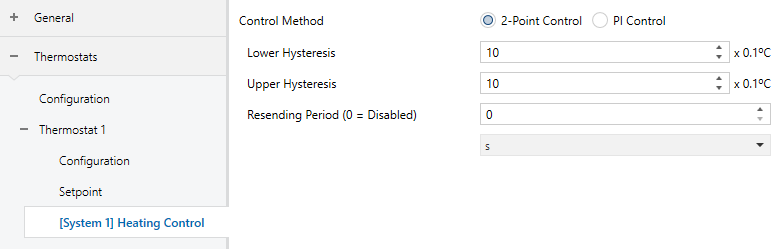
- Control Method [2-Point Control / PI Control]: selects the control algorithm to be applied. The options are 2-Point Control (section 2.2.3.1) and PI Control (section 2.2.3.2).
- Resending Period [[0…255] [s / min] / [0 / 18] [h]]: sets every how much time the control variable (i.e., object “[Tx][Sx] Control Variable (Heating)”) will be sent to the bus. A value of “0” disables the sending.
Note
The additional system control variable will only be sent periodically if the additional system is turned on.
If 2 systems are selected for the heating mode, a tab appears for each system ([System 1] Heating Control and [System 2] Heating Control). Both tabs are identical and allows to configure how the system will behave if it acts as the main system. The activation and deactivation of the secondary system is defined by the activation and hysteresis bands configured in the Configuration tab (see section 2.2.1).
2.2.3.1. 2-Point Control
After selecting the 2-control method with hysteresis (see section 1.2.3.1), the following parameters must be configured:

- Lower Hysteresis [1…10…200] [x 0. 1C]: defines the value of the lower hysteresis, i.e., the width of the lower margin around the setpoint temperature.
- Upper Hysteresis [1…10…200] [x 0. 1C]: sets the value of the upper hysteresis, i.e., the width of the upper margin around the setpoint temperature.
The control variable will be in this case a one-bit object, “[Tx][Sx] Control Variable (Heat)”, which will throw the value “1” when the thermostat considers that the room needs to be heated, and the value “0” while the climate system can remain off.
This variable will be sent periodically, according to the aforementioned parameter Resending Period.
2.2.3.2. PI Control
After selecting the PI control method (see section 1.2.3.2), the following parameters must be configured:
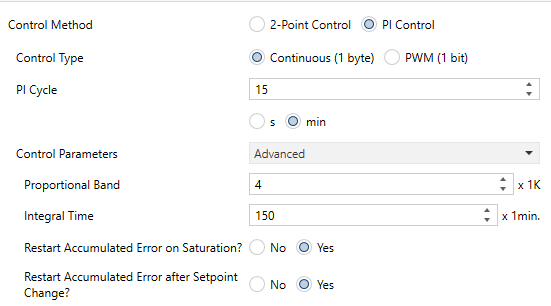
The control variable (“[Tx][Sx] Control Variable (Heat)”) in this case may be either a one-byte or a one-bit object, depending on the configuration of the Control Type parameter, as explained below.
The configurable parameters are:
- Control Type [Continuous (1 byte) / PWM (1 bit)]: sets whether the climate system valve should be controlled through precise positioning or through on/off orders.
In case of choosing Continuous (1byte), the following objects will be available:
- “[Tx][Sx] Control Variable (Heat)”: one-byte control variable that will reflect the degree of openness required in the valve (100% = entirely open; 0% = entirely closed).
- “[Tx][Sx] PI State (Heat)”: one-bit object that will remain “0” while the PI signal is equal to 0%, and will be set to “1” when the PI signal is greater than 0%
In the second case, PWM (1 bit), these objects will be available together with another new one-bit object:
- “[Tx][Sx] Control Variable (Heat)”: although the same name as the above one-byte variable, will alternatively adopt the values “1” and “0” depending on the cycle time (PI Cycle [[10…255] [s] / [1…15...255] [min]]) so that the time proportion between the two states equals the aforementioned degree of openness.
Moreover, when the control type is set to PWM (1 bit), the following specific parameters need to be configured:
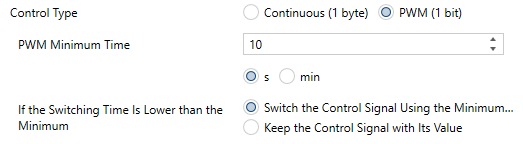
- PWM Minimum Time [[1…10…255] [s] / [1...30] [min]]: minimum time the control signal should stay unchanged, in order to prevent rapid relay commutations.
- If the switching time is lower than the minimum [Switch the control signal using the minimum time / Keep the control signal with its value]: sets what to do when the control signal needs to switch its state faster than what the above parameter allows.
- PI Cycle [[10…255] [s] / [1…15...255] [min]]: sets every how much time the required degree of openness of the valve (or, in the case of the PWM modulation, the proportion between the intervals the signal is “1” and “0”) will be re-calculated.
- Control Parameters [Warm Water / Floor Heating / Electric Heating / Blow Convector / A/C Split / Advanced]: defines the desired values for the K and T parameters of the PI algorithm. It is highly encouraged to make use of the pre-set values (see Annex I: Pre-set Values for the PI Control) however it is possible to specify custom values (Advanced). Selecting the latter brings the following parameters.
- Proportional Band [1…4…15] [x 1K]: defines the value for K (the proportional constant).
- Integral Time [5…150…255] [x 1min]: sets a value for T.
- Restart Accumulated Error on Saturation? [No / Yes]: allows the accumulated error to reset in case the control signal becomes saturated (see section 1.2.3.2). In case of selecting any of the pre-set values for control parameters, this option will be implicitly enabled.
- Restart Accumulated Error after Setpoint Change? [No / Yes]: allows the accumulated error to reset when a setpoint change occurs (see section 1.2.3.2). In case of selecting any of the pre-set values for control parameters, this option will be implicitly disabled.
2.2.4. [System x] Cooling Control
The “[System x] Cooling Control” tab offers the integrator the option to set the algorithm and all the parameters involved in the Cooling working mode of the thermostat. For a proper configuration it is important to first read the initial sections of this user manual.
The parameters in this tab and all the communication objects involved are analogous to those of the “[System x] Heating control” (see section 2.2.3), although in this case they refer to the Cooling mode of the thermostat (e.g., the related communication objects include the word “(Cool)” in their names, instead of “(Heat)”).
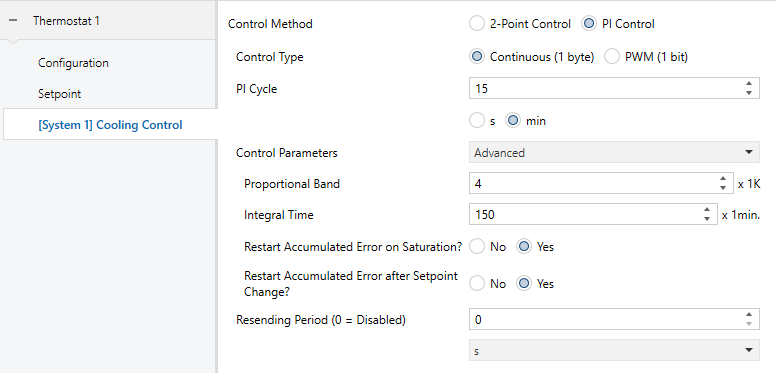
If 2 systems are selected for the cooling mode, a tab appears for each system [System 1] Cooling Control and [System 2] Cooling Control. Both tabs are identical and allows to configure how the system will behave if it acts as the main system. The activation and deactivation of the secondary system is defined by the activation and hysteresis bands configured in the Configuration tab (see section 2.2.1).
On the other hand, the PI control is provided in this case with the following pre-set options for the control parameters [Cooling Ceiling / Blow Convector / A/C Split / Advanced] (see Annex I: Pre-set Values for the PI Control).
2.2.5. Scenes
After enabling Scenes in the general Configuration (see section 2.2.1), a new tab will be included into the menu on the left.
As shown in Figure 25, from this tab it is possible to independently enable up to five scenes, and to configure what action will be taken over the different attributes of the thermostat.
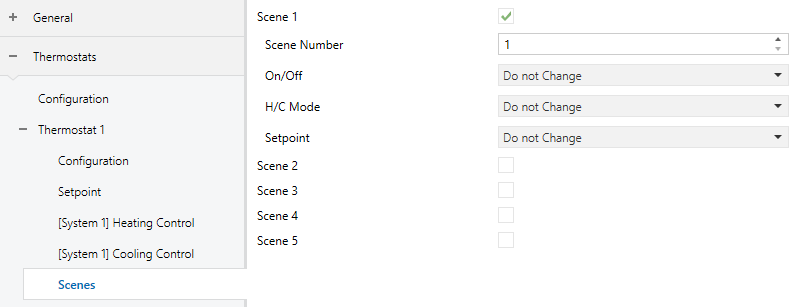
For each of the five scenes, the parameters are:
- Scene Number [1...64]: number of the scene the arrival of which (through “[Thermostat] Scene: Input”, decremented by one according to the standard) will trigger the execution of the actions defined below.
Note
The reception of scene-saving commands (values between 128 and 191) is also possible, so that the configuration initially parameterised for the scene can be overwritten with the one the thermostat is executing at a certain time. See section 1.2.7.
- On / Off [Do not change / On / Off]: sets the on/off state the thermostat will adopt upon the execution of the scene. In case the option Thermostat always ON (section 2.2.1) has been activated, this parameter will not be available.
Note
If this is set to Do not Change, the on/off state of the thermostat will be also ignored when saving the scene. See section 1.2.7.
- H/C Mode [Do not change / Cooling / Heating]: sets the general operation mode the thermostat will adopt upon the execution of the scene. In case the option H/C Automatic changeover (section 2.2.1) has been activated, this parameter will not be available.
Note
If this is set to Do not Change, the general operation mode of the thermostat will be also ignored when saving the scene. See section 1.2.7.
- Setpoint [Do not Change / Comfort / Standby / Economy / Protection / Custom Setpoint]: sets a specific setpoint value or a specific special mode the thermostat will adopt upon the execution of the scene. Note that under a basic configuration of the thermostat (section 2.2.1) only Custom Setpoint and Don’t Change will be available.
When setting the option Custom Setpoint, Setpoint Value will show up:
- In case of having selected the absolute setpoints control method (section 2.2.2.1), the available range will be -20 ºC to 100 ºC.
- In case of having selected the relative setpoints control method (section 2.2.2.2), the available range will remain the same however in this case they will refer to the base reference, and not to the setpoint itself.

Note
If this is set to Do not Change, the current special mode or setpoint of the thermostat will be also ignored when saving the scene. See section 1.2.7.