Zennio Thermostat: 1. Introduction
Simple/Advanced Thermostatic Control Module
1.1. Features
A variety of Zennio devices feature a module for performing a thermostatic control of the room by monitoring a set of indicators. Depending on the configuration and the setpoint (or target) temperature, different commands addressed to the interfaces that interact with the climate system will be transmitted over the KNX bus, so that the temperature setpoint can be achieved.
The thermostatic control function does not require connecting inputs or outputs to the device as all the communication takes place through the KNX bus.
Important
To confirm whether a particular device or application program incorporates the thermostat function, and whether it is the Zennio thermostat, the Hospitality thermostat, the Building thermostat or the Home thermostat, please refer to the device user manual, as there may be significant differences between the thermostat function of each Zennio device.
1.2. Basic Concepts
1.2.1. Temperature
Prior to describing the thermostatic control procedure, it is important to clarify the following basic concepts:
- Setpoint temperature: this is the target temperature to be reached in the room, according to the user requirements. Although initially set by parameter, the setpoint temperature may vary at the user’s request, depending on their needs each time.
- Reference temperature: this is the actual ambient temperature registered in the room at a certain time and is typically provided by an external KNX device with temperature measurement capabilities.
It is also possible to combine two different reference temperatures obtained from separate sources (one of which can be the internal temperature probe of some Zennio devices). Such combination, the result of which will be referred as effective temperature, can be done in different proportions:
| Proportion | Source 1 | Source 2 |
|---|---|---|
| 1 | 75 % | 25 % |
| 2 | 50 % | 50 % |
| 3 | 25 % | 75 % |
Of course, it is necessary to group under the same address the objects provided for the reception of the reference temperatures and the corresponding objects from the devices that will measure them (or with the object of the internal probe of the device itself, if required).
The Zennio thermostat can take care, if configured, of automatically switching between the two main operation modes (Cooling and Heating) by comparing the setpoint and the reference temperatures. This is detailed in later sections of this document.
1.2.2. Operation Modes
The integrator must first configure which of the simplified operating modes (cooling, heating or heating and cooling) will be available, so that the thermostat can manage heating, cooling or combined situations respectively, by sending the corresponding commands to the bus.
If the thermostat is configured for both heating and cooling functions, it will be possible to parameterise the periodic transmission of both control signals – not only that of the active mode – (the inactive mode’s control signal being zero).
Likewise, assuming that both simplified operating modes have been enabled, it is possible to choose whether the switching between one mode and the other will be automatic, manual (depending on the state of a binary communication object), or a combination of both automatic + manual (depending on the state of a 1-byte communication object).
1.2.2.1. Manual Mode Switch
When the simplified mode switching is configured as manual, the change of simplified mode is carried out via a 1-bit communication object, where a value of “0” activates the simplified cooling mode and a value of “1” activates the simplified heating mode. The thermostat will confirm the operating mode (whenever it is modified) through the simplified mode status object.
1.2.2.2. Automatic Mode Switch
When the simplified mode switching is configured as automatic, the thermostat itself will determine which simplified operating mode should be active at any given time, notifying this through the mode status object.
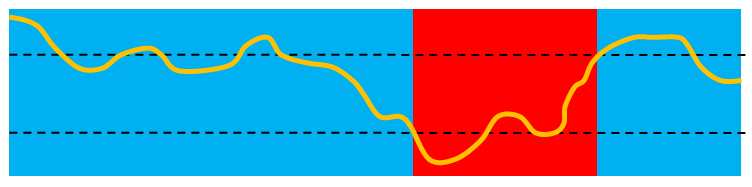
The automatic switching consists of comparing the external reference temperature with the special mode setpoints of both the current simplified operating mode and the opposite simplified operating mode:
- The thermostat will automatically switch from the simplified heating mode to the simplified cooling mode when the reference temperature is greater than or equal to the cooling mode setpoint
- The thermostat will automatically switch from the simplified cooling mode to the simplified heating mode when the reference temperature is less than or equal to the heating mode setpoint.
The following figure illustrates this algorithm.
Setpoint
(Heating)Setpoint
(Cooling)Heating ModeCooling ModeCooling Mode
Note
For the correct operation of the automatic switching function, the setpoint of the simplified cooling mode must be higher than that of the simplified heating mode.
Nevertheless, the operation of the Zennio thermostat does not depend solely on the simplified operating mode (cooling / heating); it also incorporates a series of special modes, each of which defines different actuation bands and specific setpoints for cooling and heating respectively, as will be explained in section 1.2.5.
Thus, the aforementioned automatic mode switch considers the current special mode. Moreover, in the specific case where the current special mode is Comfort, and under a basic configuration (1.2.5.1) or relative setpoints (1.2.5.11.2.5.2.2), it is also possible to apply upper and lower dead bands around the setpoint temperatures, so that:
- When operating in Comfort mode and in the simplified heating mode, the thermostat will automatically switch to the simplified cooling mode when the reference temperature is equal to Comfort cooling setpoint plus the upper dead band.
- When operating in Comfort mode and in the simplified cooling mode, the thermostat will automatically switch to the simplified heating mode when the reference temperature is equal to Comfort heating setpoint minus the lower dead band.
The use of these dead bands is particularly useful when identical setpoint temperatures are configured for the simplified heating and cooling modes within Comfort special mode.
Two communication objects will be available for each dead band (upper and lower), through which it will be possible to modify at runtime the value initially parameterised.
1.2.2.3. Automatic + MANUAL SwitchING
When the simplified mode switching is configured as automatic + manual, it will be possible to select the desired switching type — automatic or manual — in the same way, after programming.
When this type of switching is configured, a single 1-byte control object “[Tx] Mode” will be available, together with two status objects associated with it: “[Tx] Mode (status)” which indicates the switching type — ‘0’ means that the switching between simplified modes is automatic (see section 1.2.2.2), while ‘1’ and ‘2’ indicate that the switching is manual, with ‘1’ corresponding to the simplified heating mode and ‘2’ to the simplified cooling mode and “[Tx] Simplified Mode (status)”, whose behaviour is the same as described in section 1.2.2.1.
1.2.3. Control Methods
Room thermostatic control consists in sending the proper orders to the climate system, so the room ambient temperature reaches a certain setpoint and then remains stable around that value.
Different algorithms are possible to perform such temperature control. The Zennio thermostat lets the integrator select one of the following two:
- Two-Point Hysteresis Control.
- Proportional-Integral (PI) Control.
1.2.3.1. Two-Point Hysteresis Control
Similar to the climate control performed by conventional thermostats. The basis of this algorithm consists in commuting the control signal between “on” and “off” depending on whether the reference temperature has reached the setpoint or not.
Indeed, apart from the setpoint temperature, two values of hysteresis (lower and upper) are required to define a hysteresis or margin around the setpoint, therefore preventing a continuous commutation between the two modes.
Example: Two-Point Hysteresis.
- Let the initial setpoint be 25 ºC, with an upper and lower hysteresis of 1 ºC for the Heating mode. Supposing an ambient temperature of 19 ºC, the system will start heating the room. Once the temperature is 25 ºC, it will continue heating until it becomes 26 ºC, which is the upper limit of the hysteresis band. The climate system will then shut down and will remain off until the ambient temperature is lower than 24 ºC (not 25 ºC), after which it will turn on again.
- This algorithm throws a very particular temperature graph:
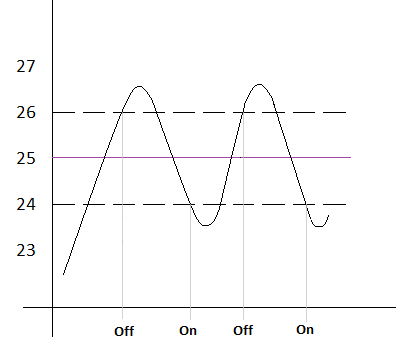
- Setpoint
The main disadvantage of this algorithm, when compared to other advanced systems, is the permanent fluctuation around the setpoint temperature, which has a direct impact on the power consumption and on the comfort:
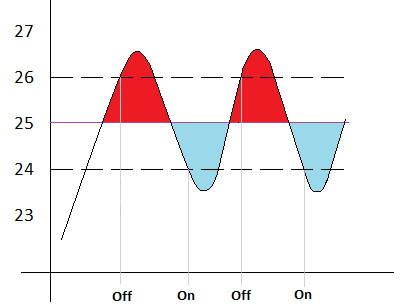
The Red-colour sections correspond to periods of unnecessary power consumption, and of lack of comfort due to excessive heat. On the contrary, the blue-colour sections indicate a lack of comfort due to insufficient heating.
The two-point hysteresis control will be restarted when any of the following occurs:
- The current operation mode (Cooling/Heating) changes.
- The current special mode changes.
- The thermostat is switched on.
- The device is restarted.
- The setpoint temperature changes.
1.2.3.2. Proportional-Integral (PI) Control
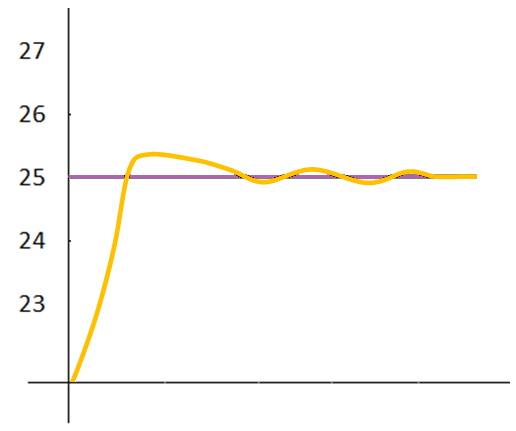
It is a lineal control algorithm based not only on the difference between the setpoint and the reference, but also on the history of the system. In addition, the control signals sent are not strict open/close orders, but intermediate orders. This reduces the temperature oscillation and the non-comfort sections of the previous algorithm, making the ambient temperature become progressively stable around the setpoint.
This algorithm requires configuring three main parameters:
- Proportional Constant (K): expressed in terms of degrees, estimates an error value proportional to the difference between the setpoint and the reference temperature.
- Integral Time (T): expressed in minutes, this constant depends on the thermal inertia of the climate system and makes it possible to adjust the error of approximation depending on the elapsed time.
- PI Cycle Time: expressed in minutes or seconds, this cycle time is taken into account for setting the temperature sampling frequency and therefore the update frequency of the control signal being sent.
Although the Zennio devices let expert users manually set custom values for the above parameters, generally it is preferable to make use of one of the pre-set options, which should fit the most common climate situations (see Annex I: Pre-set Values for the PI Control).
Regarding the control signals of the PI mode, they can be expressed in two forms:
- Continuous PI: the control variable will throw percentage values, thus indicating how much the valve of the climate system should open. For instance, a value of 50% will indicate that the gate must remain half open. Of course, this method only applies to advanced systems, where the valves permit intermediate positioning.
- PWM (Pulse Width Modulation): the control variable will be in this case binary, being therefore possible to control “on/off” valves, i.e., valves not permitting intermediate positions. Partial opening of the valve (for example: at 50%) is therefore emulated by successively opening/closing it (entirely) for similar time portions.
To prevent repeatedly opening and closing the gate relays, it is possible to define a minimum PWM signal commutation time. In addition, it is possible to specify what to do in case a PWM time lower than the minimum time is required: commuting the control signal (applying the minimum time) or ignoring the commutation.
Note
For a proper behaviour of this kind of control, it is necessary that the PI cycle time is at least twice the minimum PWM commutation time.
Example: PI control with PWM.
- Let a “continuous PI” thermostat control system determines a control variable of 25%, which will be interpreted by intermediate-positioning valves as an order to open to 25%. The equivalent PWM variable for that would be a binary signal that remains at high level (value “1”) for 25% of the configured PI cycle time, and at low level (value “0”) during the remaining 75% of the cycle time. Therefore, an on/off valve will stay entirely open 25% of the time, and entirely closed 75% of the time.
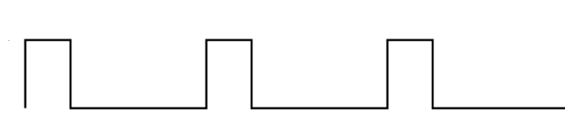
- Average Value (25%)▼|───── PI Cycle Time ─────|▼
On the other hand, under situations of control signal saturation, during which the variable becomes 100% due to drastic differences between the setpoint and the reference temperature, a significant integral error will accumulate as the time passes, so once the setpoint is reached, the system will still send a positive signal because of the influence of the system history in the PI algorithm. This will cause an excessive heat/cool supply, which will take some time to be compensated. To prevent these situations, there are two strategies to reset the accumulated error:
- As soon as the setpoint is reached after a signal saturation or, in other words, once the control signal is saturated, it will remain at 100% until the setpoint temperature is reached. At that moment, without waiting for the cycle time to expire, the PI control is completely restarted, thus sending the new calculated value of the control signal (which will be 0%).
- When the setpoint temperature is modified.
Note
This is the strategy followed by default, but it can be disable in the Advanced option in the PI Control parameters (see section 2.2.3.2)
The following figures show the effect on the ambient temperature depending on whether the reset of the accumulated integral error is enabled or not.
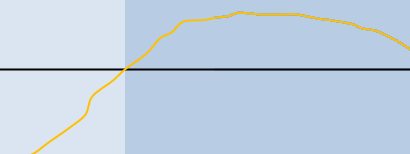
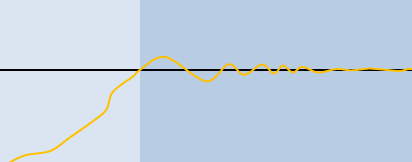
Saturation operation (signal control: 100%)Normal PI operationPI reset(control signal: 0%)Due to the integral effect, a positive control signal continues being applied for a certain period of time.Without resetWith reset
1.2.3.3. Control Under Protection special mode
With independence of the parameterised control type (two-point hysteresis or PI), under Protection special mode a variant of the two-point control algorithm will always be applied, with the following hysteresis values:
- For the simplified heating mode, a hysteresis of 0 °C below and 1 °C above will be applied.
- For the simplified cooling mode, a hysteresis of 1 °C below and 0 °C above will be applied.
The outputs will behave on/off: if a two-point control was configured, the output variable will take the values 0 and 1, while in the PI control it will still consist in 0s and 1s, but sent periodically.
Example: Control under Protection special mode.
- Suppose setpoint temperatures in the Building Protection special mode of 7 ºC and 35 ºC for Heating and Cooling, respectively, and a PI control with a percentage signal-type.
- Case 1: when working in the Heating mode, a control order of 100 % will be sent as soon as the reference temperature reaches 7 ºC, and of 0 % as soon as it is greater than 8 ºC.
- Case 2: when working in the Cooling mode, a control order of 100 % will be sent as soon as the reference temperature reaches 35 ºC, and of 0 % as soon as it is lower than 34 %.
1.2.4. Additional Cooling / Heating
The Zennio thermostat is capable of simultaneously controlling two heating or cooling sources (such as air-conditioning units, heat pumps, etc.). One of the sources operates as the main system and the other as the additional system, and it is possible at any time to decide which of the two acts as the main one. Furthermore, the priority between both systems can be alternated, and it is even possible, at runtime, to disable one of them so that the remaining system automatically assumes the role of the main and only system. In this way, a more effective thermostatic control can be achieved by combining multiple climate systems for the same purpose, thereby providing a higher level of comfort.
As an example of this function, think of a room where the primary climate system is a radiant floor system (which is known to have a high thermal inertia and a moderately slow response after setpoint changes) and a split air conditioner working as a support system, being the latter capable of a more agile response when significant setpoint changes occur.
The additional system has the same configuration possibilities as the main system, being possible to choose between a 2-Point Control and a PI Control. To configure the additional heat/cool function, it is necessary to define an activation band and a deactivation hysteresis. Once these values have been defined, the behaviour is as follows:
- Simplified cooling mode: as soon as the reference temperature is greater or equal than T1 (being T1 the sum of the setpoint temperature plus the Additional Cool band), the additional cool system will be activated. Then, it will switch off once the reference temperature is lower or equal than T2 (being T2 the subtraction of T1 minus the deactivation hysteresis).
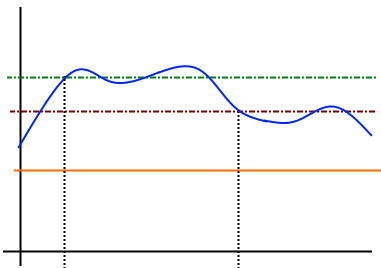
Setpoint + Activation BandSetpoint + (Activation Band – Deactivation) HysteresisTemperatureSetpointAddSys.OFFAdditional System ONAdditional System OFFT1T2
Figure 5. Switching the additional system on and off in cooling mode
Example: Additional cooling with 2-Point control.
- Suppose a setpoint temperature of 23 ºC, an Activation Cool band of 2.5 ºC and a Hysteresis of 1.5 ºC. When the reference temperature is 25.5 °C or higher, the additional cooling system is switched on and it will be switched off when the reference temperature is 24 °C or lower.
- Simplified heating mode: the operation is equivalent to the one described for the simplified cooling mode. As soon as the reference temperature is lower or equal than T3 (being T3 the subtraction of the setpoint temperature minus the Additional Heat band), the additional heat system will come into operation to provide a more effective heating. Then, it will switch off once the reference temperature is greater or equal than T4 (being T4 the sum of T3 plus the deactivation hysteresis).
- Setpoint + Activation BandSetpoint + (Activation Band – Deactivation)TemperatureSetpoint AddSys.OFFAdditional System ONAdditional System OFFT3T4
Figure 6. Switching the additional system on and off in heating mode
Example: Additional Heating with PI Control.
- Suppose a setpoint of 23 ºC, an Activation Heat band of 2.5 ºC and a Hysteresis of 1.5 ºC. When the reference temperature is 20.5 ºC or lower, the additional heating system will be switched on sending the corresponding control signal. This system will be switched off when the reference temperature is 22°C or higher.
Note
In case use Two-Point Hysteresis Control as additional system, the Hysteresis will not be taken into account, with priority given to the activation and deactivation band.
In both modes, it will be possible to force the activation of the additional system, ignoring the normal configured activation and deactivation conditions. If the additional system is forced, it will automatically switch off once the configured setpoint temperature is reached.
Likewise, once its activation has been forced, the additional system can be deactivated whenever required.
In both simplified cooling and heating modes, for the forced activation of the additional system to take effect, it is required that the room temperature is below or above the configured setpoint, depending on the thermostat’s operating mode. Otherwise, the additional system will not start until the configured activation conditions are met and another forced start command is received.
Note
When the thermostat is switched off, or when the simplified heating/cooling mode is changed, the forced activation of the additional system is cancelled.
1.2.5. Special Modes
Regardless of the simplified operating mode (cooling/heating), the Zennio thermostat will always have one of the available special modes active. Depending on the configuration, up to four special modes are available: Comfort, Standby, Economy, and Protection (also referred to as Building Protection).
Each of these special modes is characterised by two setpoint temperatures — one for the simplified cooling mode and another for the simplified heating mode — which are configured by parameter but can be modified at runtime through a dedicated communication object for each special mode, except for Protection special mode.
In this way, it is possible to adapt the climate control to different situations simply by switching to the corresponding special mode.
- Comfort Mode: this special mode is intended to perform usual climate control, i.e., while there are people present in the room. Therefore, the setpoint values under this special mode should guarantee their comfort.
- Standby Mode: this special mode is intended for short periods during which the room remains empty. For example, think of the staff of a company leaving the office due to a meeting in an adjacent one, after which they will come back. In such case, it is possible to slightly relax the setpoint values to reduce consumption.
- Economy Mode: this special mode is intended for longer periods with no presence in the room. For example, when the day ends and the occupants of the room leave it till the next morning. Under these circumstances, a relaxed enough setpoint would rather reduce the power consumption.
- Protection Mode: this special mode is typically reserved for abnormal situations where external factors are conditioning the room climate control: repair works, a broken window or any circumstance because of which the room is going to stay empty for a long time. In such case, a considerably low (Heating mode) or considerably high (Cooling mode) setpoint can be established so that the climate system remains normally off, unless extreme temperature values are actually reached.
Note
It is not possible to modify the temperature setpoint for this mode in runtime.
Note
That the thermostat will necessarily stay at one of the above special modes every time. When switching from one mode to another, the setpoint temperature will automatically change to that of the selected mode.
Although the integrator is free to configure any desired setpoints for each of the special modes, it is important to ensure an efficient configuration in which, at the very least, Standby setpoints are set between those of Comfort special mode (more demanding) and Economy special mode (less demanding).
In any case, the setpoints can be modified at any time during runtime, with the possibility of restoring them to their initial values (i.e., those configured by parameter) through a specific communication object. Note that if a new setpoint value is defined at runtime, the thermostat will automatically switch to the special mode that best matches the new value.
Example: Special Modes. Suppose the following configuration:
- Cooling Mode.
- Comfort Setpoint: 23 ºC.
- Standby Setpoint: +3 ºC with respect to Comfort setpoint.
- Economy Setpoint: +5 ºC with respect to Comfort setpoint.
- Heating Mode.
- Comfort Setpoint: 21 ºC.
- Standby Setpoint: -3 ºC with respect to Comfort setpoint.
- Economy Setpoint: -5 ºC with respect to Comfort setpoint.
Being under the Heating mode and Comfort special mode, a new setpoint of 18 ºC is manually set (via communication object). The thermostat will then switch automatically to Standby special mode. After that, if the setpoint gets changed to 16 ºC, Economy special mode will be triggered automatically. Finally, if an order to activate Comfort special mode arrives (via object) then the setpoint will change to 21 ºC.
The behaviour would be analogous in case of progressively increasing the setpoint temperature. Depending on the reference temperature, the thermostat may commute from Heating to Cooling at some point during the above sequence. In such case and depending on the parameterised setpoints for the special modes under the Cooling mode, the actual behaviour may differ slightly.
The configuration and the control of the setpoints and the special modes can be done in two ways: basic and advanced. A specific parameter is provided to configure the Zennio thermostat as either of them.
1.2.5.1. Setpoints (Basic Configuration)
In case of configuring the thermostat type as basic, defining the setpoints of the special modes will be much easier than in the advanced type:
- Only Comfort and Protection special modes will be available, and there will be no specific objects for manually switching between them.
- The thermostat will automatically switch between one special mode and the other (Comfort, Protection) depending on the active setpoint, although the windows status objects (see section 1.2.6) will also permit switching from one mode to the other.
- In Comfort special mode, the same setpoint will apply to both simplified heating and cooling modes. This setpoint is initially configured by parameter and is referred to as the initial setpoint after programming.
- Comfort special mode setpoint temperature will be modifiable in runtime using a two-byte communication object, through which the desired setpoints will be received. The setpoint can also be changed using a 1-bit communication object that increase or decrease the setpoint by 0.5 ºC.
- Under Protection special mode, the setpoints will be 7 ºC and 35 ºC, respectively for simplified heating and cooling modes.
- In case of having activated the automatic commutation between the simplified Cooling and Heating modes, it will be as well necessary to define a dead band around the setpoint (see 1.2.2.2).
1.2.5.2. Setpoints (Advanced Configuration)
All special modes mentioned in section 1.2.5 will be available for the advanced type. Switching between them will be possible through four binary objects (one per special mode), or through a one-byte object. The former four and the latter work independently: a mode switch order through the one-byte object will be executed unconditionally, no matter which the state of the one-bit objects is. Nevertheless, they will be updated so that only the one corresponding to the new mode has the value “1”.
For their part, the binary objects can behave in two ways:
- Trigger: activating a special mode will require sending one “1” through the object corresponding to that mode. Sending one “0” will have no effect.
- Switch: activating a special mode will require sending one “1” through the object corresponding to that mode, provided that there are no other mode objects with a higher priority and with that value at the same time (therefore, the value “0” necessarily deactivates a mode). The priority is set to the following order: Protection > Comfort > Standby > Economy.
Additionally, the integrator can make use of a specific parameter to set which special mode should remain active in case all the aforementioned one-bit objects are found to have the value “0”.
Regarding the configuration and control of setpoint temperatures, the advanced thermostat allows two alternative procedures: absolute setpoints or relative setpoints.
In both cases, it is possible to use dedicated communication objects (one for each special mode) to modify the setpoints at runtime. It is the responsibility of the integrator to maintain the previously mentioned consistency between the different special modes; otherwise, the automatic switching of the special mode based on the thermostat’s working setpoint might not operate correctly.
1.2.5.2.1. Absolute Setpoints
This method allows direct control of the desired absolute temperature, either by means of a generic two-byte communication object common to all modes, or through the dedicated two-byte communication object of each special mode, through which the desired setpoint value is received.
Alternatively, the setpoint can be adjusted using a one-bit communication object that increases or decreases it by a step value defined in the parameters. If the received setpoint differs from the previous one, the new setpoint value will be returned through the status object (except in Protection special mode), which will always return the parameterised initial setpoint and cannot be modified at runtime.
In this method, parameterising the setpoints consists in the following:
- The setpoint temperatures of Comfort special mode (both for the simplified heating mode and for the simplified cooling mode) are defined in absolute terms (e.g., 21 ºC and 23 ºC).
- The setpoint temperatures of Standby and Economy special modes (both for the simplified heating and cooling modes) will be expressed, in tenths of a degree, as an offset from Comfort setpoint. For example: 25 and 50 (i.e. 2.5 °C and 5 °C respectively).
- The setpoint for Protection special mode (both the one for Heating and the one for Cooling) will be defined in absolute terms (e.g., 40 ºC).
- The following diagram illustrates this:
Comfort (Cooling)Comfort (Heating)Standby (Cooling)Economy (Cooling)Standby (Heating)Economy (Heating)Standby
(Cooling)Economy
(Cooling)Standby
(Heating)Economy (Heating)
Note
It is possible to modify, at runtime, the setpoints of each special mode (Comfort, Standby and Economy) for each simplified cooling or heating mode. It is the responsibility of the integrator or user to comply with the conditions shown in Figure 7. Failure to comply with these conditions may result in unpredictable thermostat behaviour.
Example: It would be possible, for the simplified heating mode, to have a Standby setpoint of 23 °C and a Comfort setpoint of 21 °C. In this case, the criterion shown in Figure 7 would not be met, and the thermostat’s behaviour would be unpredictable.
On another hand, it is possible to set (“Permanently apply change to special mode setpoint”) whether the setpoint change commands received in runtime through the setpoint communication objects should overwrite or not the initial setpoint (i.e., the one defined in ETS). In other words: whether the setpoint defined in ETS should always apply when entering that particular special mode, or whether the setpoint that was active before leaving that special mode should still be active in case of switching back to it.
The specific cases where the setpoints of the special modes should be stored/overwritten can be configured separately:
- When switching to another special mode.
- When switching to another simplified operating mode (cooling/heating).
- When the setpoint is changed.
Notes
- When only the storage after special mode change function is enabled, the updated setpoint temperature will only be stored if the new special mode has been activated through an explicit command (via a 1-bit or 1-byte communication object) to change the special mode. In the case of automatic mode changes, caused by variations in the setpoint temperature object value, the storage function will not be executed under any circumstances.
- When the “storage after setpoint change” function is enabled, if a change made through the absolute or step setpoint object triggers an automatic special mode change, the storage of the previous setpoint will take place before the special mode change occurs. That is, the setpoint immediately prior to the one causing the special mode change will be stored for the special mode that is being deactivated.
- A communication object is available to restore the setpoints to their original values, which will also change the current setpoint to the original one corresponding to the active special mode.
Example: Absolute Setpoints and Setpoint Storage.
- Under similar parameter configuration as in the example of section 1.2.5, suppose the option to permanently store the setpoint on special mode changeovers enabled.
- Case 1: being the thermostat in Comfort special mode (Cooling), the initial setpoint of 23 ºC gets manually increased by one degree (24 ºC) and afterwards by three more degrees (27 ºC, which causes an automatic switch to Standby special mode). After that, an order (via the communication object) is sent to go back to Comfort special mode. In this case, the setpoint value will become 23 ºC, as switching to Standby special mode was a decision of the thermostat itself, not an external order.
- Case 2: being the thermostat in Standby special mode (Cooling), the initial setpoint of 26 ºC gets lowered to 25 ºC due to an external order, after which another order to commute to Comfort special mode is received from the bus. The setpoint therefore becomes 23 ºC. In case a new order to switch back to Standby special mode is received, the setpoint will be 25 ºC again.
- Case 3: being the thermostat under Comfort special mode (Cooling), the initial setpoint of 23 ºC gets lowered to 22 ºC due to an external order, after which another order to commute to Economy special mode (Cooling) is received from the bus. The setpoint therefore becomes 28 ºC. In case a request to switch back to Comfort special mode is received, the setpoint will change to 23 ºC, as the current simplified mode is Cooling and 22 ºC is higher than the 23 ºC defined by parameter. Analogously, in case the current mode is Comfort special mode (Heating), no temperatures higher than 21 ºC will be stored, either.
Now suppose that only the option to store the setpoint on setpoint changeovers has been enabled:
- Case 4: the thermostat is in special mode Standby (Cooling) and the setpoint gets changed to 24 ºC. A new setpoint of 22 ºC is afterwards received, so the thermostat automatically changes to Comfort. When a new order to switch back to Standby arrives, the setpoint will change to 24 ºC again.
1.2.5.2.2. Relative Setpoints
This method, which is intended for systems of more complexity (e.g., where a sole supervisor manages the setpoint of multiple thermostats), permits configuring and controlling the target temperature in relative terms, as it will be expressed as an offset with respect to a certain base reference (Basic Setpoint).
In runtime, the setpoint may be modified by means of binary commands (each of which will add/subtract the offset by a value set by parameters) or by specifying the absolute value to be added or subtracted. To make it possible, a one-bit object and a two-byte object are provided, as well as another two-byte object for modifying the value of the base reference anytime.
The parameterisation in this case consists in:
- Defining a base reference for the temperatures (for example, 22 ºC).
- Defining the setpoint temperatures (for both, simplified modes Cooling and Heating) of Comfort, Standby, Economy and Protection special modes as an offset to the above base reference (e.g., +2.5 ºC). The setpoints for Protection special mode will be parameterised in absolute values (for example, 35 °C and 7 °C, corresponding respectively to each simplified mode).
- The following diagram illustrates this:
- Comfort
(Cooling)Confort
(calentar)Standby
(Cooling)Economy
(Cooling)Standby
(calentar)Económico (calentar)Comfort (Cooling)Comfort (Heating)Standby (Cooling)Economy (Cooling)Standby (Heating)Economy (Heating)Base Reference
Figure 8. Absolute Setpoints
To sum up, the current setpoint of the thermostat can be obtained as:
Setpoint = Base Temp. ± Mode Offset (parameter) ± User Offset (object)
Finally, it is possible to parameterise the desired initial special mode to be applied after an ETS download. Moreover, another parameter (“Permanently Apply Change to Basic Setpoint Shift”) is available to let the integrator select whether after switching to a new special mode, the previously active offset should still apply (being therefore added to the setpoint corresponding to the new mode) or not. Note that the current offset will always remain unchanged on a changeover of the operation mode (Cooling/Heating).
Example: Relative Setpoints and Offset Storage. Assume the following configuration:
- Base Temperature: 22 ºC.
- Cooling Mode.
- Offset for Comfort: +1 ºC.
- Offset for Standby: +3 ºC.
- Offset for Economy: +5 ºC.
- Heating Mode.
- Offset for Comfort: -1 ºC.
- Offset for Standby: -3 ºC.
- Offset for Economy: -5 ºC.
- Maximum Offset value: +3 ºC.
- Minimum Offset value: -2 ºC.
The option to maintain the offset value after mode switches is enabled as well. Then:
- Suppose the thermostat starts up under Standby (Cooling), and therefore with a setpoint of 22 ºC + 3 ºC + 0 ºC = 25 ºC (the value of the offset object is 0 ºC).
- An “increase” order is received through the binary control object, making the current setpoint change to 25.5 ºC.
- After that, the 2-byte offset control object receives the value +4 ºC, which would raise the setpoint to 29 ºC. However, as the maximum offset set by parameter is +3 ºC, the offset is truncated to 3 ºC, so the setpoint stays at 28 ºC.
- An order arrives now to activate Comfort special mode, whose setpoint temperature is 23 ºC. However, since the offset storage option was activated, those 23 ºC are added the 3 ºC of the currently active offset, resulting into 26 ºC.
In case a new value for the base reference is received from the bus (e.g., 25 ºC), the accumulated offset will not be reset. For instance, if such order arrives after 4), then the setpoint will become 25 ºC + 1 ºC + 3 ºC = 29 ºC.
1.2.6. Comfort Prolongation and Window Status
There are two more functions available related to the special mode changeover:
- Comfort Prolongation: permits switching to Comfort special mode by writing the value “1” to a specific one-bit object, remaining in that mode for a parameterisable time and then switching back to the previously active special mode.
This function may be particularly useful when combined with a Zennio motion detector so that Comfort special mode can be triggered for a certain time as soon as moving subjects are detected in a room that was being air-conditioned under Standby or Economy special modes.
Notes
- Comfort Prolongation function is not available if the thermostat is configured as basic.
- Consecutively receiving the value “1” multiple times during Comfort Prolongation time will make the count start over.
- Comfort Prolongation time count is interrupted if an order to change the special mode is received and also if the window status object gets triggered (see below).
- Window Status: allows up to four binary input objects “[Tx] Window Status 1…4 (Input)” to be used, which can be linked to external sensors reporting anomalous situations (such as an open window, maintenance work, etc.) in which it is advisable to temporarily relax thermostatic control by switching to Protection special mode. When a value of “1” is received through any of these objects, the thermostat will switch to Protection special mode and remain in that mode while the object retains the value “1”. Once the value returns to “0”, the thermostat will recover the mode that was active prior to the window-opening event, or any special mode changes that may have been received while the object was at “1”.
Notes
- When Protection special mode has been triggered by means of the usual special mode change objects, and not through the window object, the thermostat does execute the next special mode change order as soon as it arrives, thus leaving Protection special mode.
- If any of the window objects is activated while the current special mode is already Protection, deactivating the window event (i.e. when the object returns to “0”) will not cause the thermostat to leave Protection special mode, unless a special mode change command has been received in the meantime.
- Comfort prolongation will not be available while any window status object has the value “1”. Conversely, if any of these objects is triggered during comfort prolongation, the prolongation will be cancelled and the thermostat will switch to Protection special mode. Once the object returns to “0”, the thermostat will restore the special mode that was active prior to comfort prolongation.
If the setpoint saving after value change is active, any setpoint change via the absolute setpoint object will be stored when entering Protection special mode using any window object and applied when exiting this mode.
- While Protection special mode is active, any setpoint change that leads to a change of special mode will be stored so that, when exiting Protection special mode, the special mode will change to the corresponding one according to the new setpoint applied.
1.2.7. Scene Management
The Zennio thermostat incorporates the possibility of managing up to 5 different scenes, each of which will make it possible to execute different functions of the thermostat:
- Switch-on / Switch-off: During the execution of the scene, it will be possible to send a switch-on or a switch-off order (according to the parameterisation) through the on/off object. In case an order is received to save the scene, the parameterised value will be overwritten with the one of the on/off status object at that moment
Note
This option is not available in case the thermostat has been configured as “always on”.
- Operation Mode (Cooling / Heating): During the execution of the scene, the mode control object will send the value of the desired operation mode (Cooling / Heating), which should be set in parameters. In case of saving the scene, the value parameterised will be overwritten with the one of the mode status object at that moment.
Note
If the thermostat has been configured for only heating or only cooling, or for an automatic mode change, this option will not be available.
- Setpoint: In this case, the activation of a special mode (or of a custom setpoint value) on the execution of the scene can be parameterised.
If the second option is selected under a relative setpoint control, then the custom value will correspond to the base reference, and therefore the value of the offset will remain unchanged once the scene is executed.
When saving the scene, the above value will be overwritten with that of the corresponding status object at that moment.
All these actions can be enabled and configured independently, thus preventing any of them from being executed or saved, if desired.
Example: Executing and Running Thermostat Scenes.
The first scene is assigned the number 32, as well as the actions to switch on the thermostat and to activate Comfort special mode, leaving the Heating/Cooling mode as is.
- Case 1: being the thermostat on and in the Cooling and Standby special modes, when the order to execute the scene arrives (value “31”) it will switch to Comfort.
- Case 2: being the thermostat off, when the order to execute the scene arrives it will switch on and change to Comfort, remaining in the Heating/Cooling mode it already had before being switched off.
- Case 3: being the thermostat off and being Heating and Economy the last active modes, the order to save the scene (value “159”) arrives. Then, scene number 32 gets updated with the current state of the thermostat (off and under Economy special mode; note that the Cooling/Heating operation mode is not saved due to the original parameterisation). Afterwards, being the thermostat on and under the Cooling and Comfort special modes, if the scene execution order is received it will switch off and activate Economy special mode (leaving the operation mode in Cooling), according to what it was saved.