Temperature Probe: 2. Configuration
2.1. General - Temperature Probe
Connecting a temperature probe to one of the inputs of the device will make it capable of receiving temperature measurements and monitor them, as well as of sending those values to the bus and of reporting the detection of high / low temperature events. To that end, it is necessary to configure a set of parameters, which are different depending on whether the probe model is supplied by Zennio or by third parties.
Please note that the screenshots and object names shown next may be slightly different depending on the device and on the application program.
ETS ParameterisationWhen an input has been configured as Temperature Probe, objects “[Ix] Current Temperature” (2 bytes) and “[Ix] Probe Error” (1 bit) become visible. The former will report the current value of the temperature (periodically or after a certain increment/decrement, according to the parameter configuration), while the latter will notify (by sending the value “1” periodically) about an unexpected reading in the input line due to a breakdown or an incorrect connection of the temperature probe.
Apart from that, a specific entry will become visible in the tree on the left containing the following parameters:
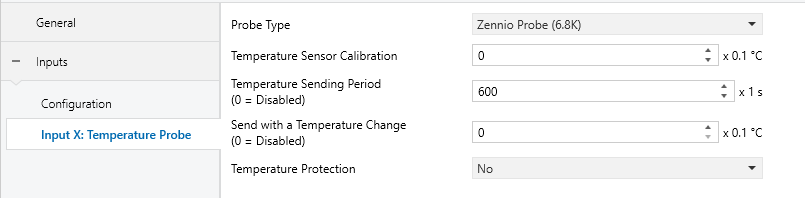
- Probe Type [Zennio Probe (6.8k) / Zennio Probe (10k) / Custom NTC Probe 1 / Custom NTC Probe 2]. When selecting “Custom NTC Probe X”, an additional parameter screen (Custom NTC Probe X) will be available below the GENERAL tab, see section 2.2.
- Temperature Sensor Calibration [-50…0…50] [x0.1ºC]: defines an offset to be applied to the measurement received from the probe to correct deviations due to external factors.
- Temperature Sending Period [0…60…65535] [x1s]: sets every how much time the value of the current temperature should be sent to the bus (through “[Ix] Current Temperature”). The value “0” leaves this periodical sending disabled.
- Send with a Temperature Change [0…255] [x0.1ºC]: defines a threshold so that whenever a new reading of the current temperature is found to differ (from the last value sent to the bus) more than such threshold, an extra sending will take place and the sending period will restart, if configured. The value “0” disables this sending.
- Temperature Protection: drop-down list with the following options:
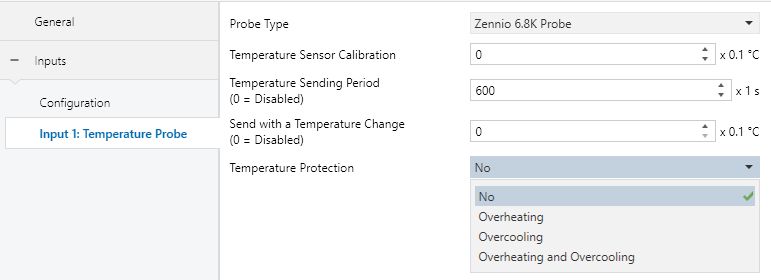
- No: no temperature protection is required.
- Overheating: overheating protection is required. Three extra parameters will come up:
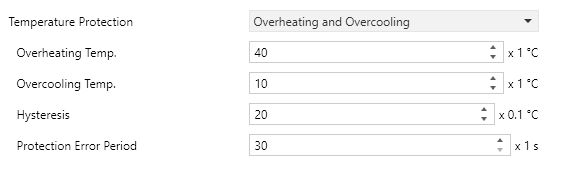
- Overheating Temp. [-30…40…125] [x1ºC]: maximum temperature permitted. Temperature readings greater than this will be considered overheat, and therefore a “1” will be periodically sent through object “[Ix] Overheat”. Once the overheat is over, a “0” will be sent (once).
- Hysteresis [1…20…200] [x0.1ºC]: dead band or threshold around the overheat temperature defined above. This dead band prevents the device from sending the overheat alarm and no-alarm over and over when the current temperature keeps fluctuating around the overheat limit (T).
Once the overheat alarm has been triggered, the no-alarm will not be sent until the current temperature is lower than that T minus the hysteresis. After that, if the current temperature reaches T again, the alarm will be re-sent.
- Protection Error Period [30…65535] [x1 s]: period which the overtemperature or overcooling error will be resent while the error is active.
- Overcooling: overcooling protection is required. Two extra parameters (analogous to the above two) will come up:
- Overcooling Temp. [-30…10…125] [x0.1ºC]: minimum temperature permitted. Temperature readings lower than this will be considered overcool, and therefore a “1” will be periodically sent through object “[Ix] Overcool”. After the overcool is over, a “0” will be sent (once).
- Hysteresis [1…20…200] [x0.1ºC]: dead band or threshold around the overcooling temperature. As for the overheat, once the alarm has been triggered, the no-alarm will not be sent until the current temperature is greater than T plus the hysteresis. After that, if the current temperature reaches T again, the alarm will be re-sent.
- Overheating and Overcooling: both overheating and overcooling protection are required. The following three parameters will come up:
- Overheating Temp.
- Overcooling Temp.
- Hysteresis.
- Protection Error Period.
The four of them are analogous to those already explained separately.