Motion Detector: 2. Configuration
Please note that the screenshots and object names shown next may be slightly different depending on the device and on the application program.
2.1. Input X: Motion Detector
Once the corresponding input of the device has been configured to work as a motion detector (please refer to the user manual of the device itself for further details), a new tab shows up to configure the parameters related to this input (see Figure 2).
ETS ParameterisationWhen an input has been configured as motion detector, a set of communication objects are available by default:
- [Ix] Short Circuit Error: 1-bit object that will notify the KNX bus (by sending a “1” every 30 seconds) about short-circuit events in the detector wiring or in the detector itself. Once solved, the value “0” will be sent (once) through the same object.
- [Ix] Open Circuit Error: 1-bit object that will notify the KNX bus (by sending the value “1” every 30 seconds) about open-circuit events in the detector wiring or in the detector itself. Once solved, the value “0” will be sent (once) through the same object.
- [Motion Sensor] Scene Input: 1-byte object through which it will be possible to receive scene values (0 – 63, both included) from the bus.
- [Motion Sensor] Scene Output: 1-byte object through which it will be possible to send scene values (0 – 63, both included) to the bus.
The following parameters are available in the configuration tab:
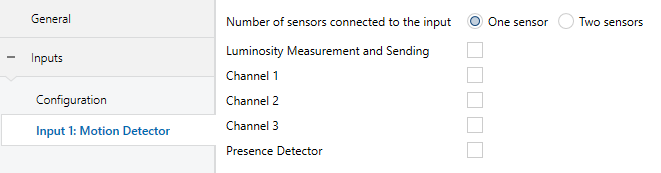
- Number of sensors connected to the input [One sensor / Two sensors]: sets the number of sensors connected to the same input, in order to adequately calibrate the luminosity and detection readings.
- Luminosity Measurement and Sending [enabled / disabled]: activates or deactivates the option to periodically send the luminosity level to the KNX bus (in terms of percentage or Lux, through object “[Ix] Luminosity”). If checked, the following parameters show up:
- Period [0…15…255] [x 1s]: period for sending the luminosity level to the bus. If set to 0, the periodic sending remains disabled.
- Luminosity change to send [0…100] [%] / [x 10 Lux]: sets a certain increment so that when two consecutive readings of the luminosity are found to differ by more than such value, an extra sending of the luminosity to the bus will take place. If set to “0”, this type of transmission is disabled.

As stated, the luminosity level is sent through the “[Ix] Luminosity” 1-byte object. The higher the light level detected in the room is, the greater the value of this object will be.
Note
Bear in mind that during continuous motion detection, the value of the luminosity level may take a little more time to update, as both signals (detection and luminosity) share the same input port of the device.
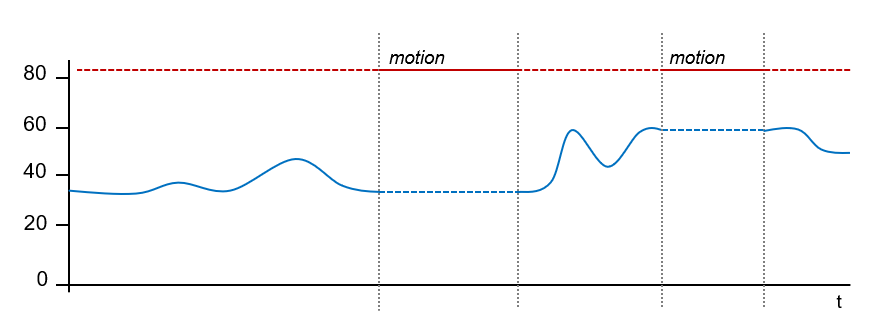
- Channel X [enabled / disabled]: activates or deactivates the different virtual detection channels. Every channel will work independently, which makes it possible to set different parameters (delays, thresholds, etc.) and different parallel reactions to the readings sent by a sole physical detector.
- Presence Detector [enabled / disabled]: activates or deactivates the presence detection function.
2.1.1. Channels
Each input enables up to three motion detection channels. These channels share the same hardware status, i.e., they read the same information about motion, luminosity and errors in the input. However, each of them can have a different configuration in relation to:
- Motion detection conditions.
- Values sent when entering the “Detection” and “No Detection” states.
- Other configurations as channel disablement, restricting the sendings depending on the luminosity, forced state and external motion sensor.
These options are detailed below.
2.1.1.1. Motion Detection Conditions
The channel will switch to the “Detection” state when a motion detection signal is received from the sensors and to the “No Detection” state when such signal is no longer received.
- When the channel switches to the “Detection” state, a time count will begin. This count will be restarted whenever a motion detection signal is received.
- After some time (Detection Length) without further motion detections, the channel will switch to the “No Detection” state.
- At that moment, a new time count (Blind Time) begins so that any motion detections that may take place before it expires will be ignored.
- Once the blind time expires, the device will adopt the “Detection” state as soon as a new motion detection takes place.
The following example illustrates this.
Example: Detection States.
- The graph below shows the following succession of events:
- At t1, the sensor activates the motion signal. The channel switches then to the “Detection” state and sends a “1” through “[Ix][Ci] Detection State”, making for example a lamp turn on.
- At t2, motion is no longer detected; however, the channel remains in “Detection” and starts counting the parameterised Detection Length time (T1).
- At t3, the channel switches to “No Detection” and sends a “0” (making the lamp turn off). After that, it starts counting the parameterised Blind Time (T2).
- Although at t4 the sensor starts reporting motion again, the channel does not switch to “Detection” until T2 ends, that is, until t5.
- At t6 the sensor stops reporting motion, so the channel starts a new Detection Length count.
- At t7, before T1 concludes, motion is reported again, so the count for the Detection Length is interrupted, remaining the channel in “Detection” without having switched to “No Detection” between t6 and t7.
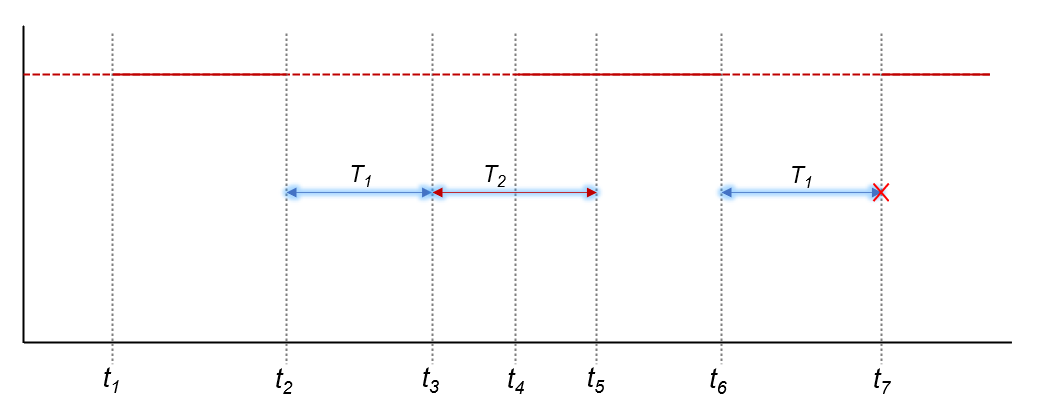
- Figure 5. Channel Detection States vs. Motion Signal
When a channel is enabled, ETS displays a new tab (“Channel i”), which is divided into several parts with the first one being:
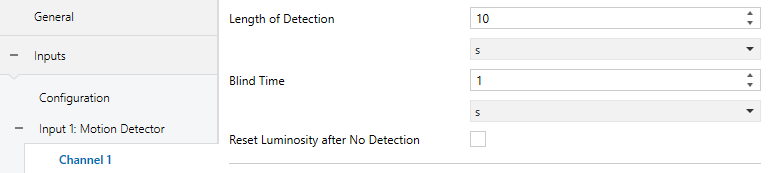
The upper parameters of this tab basically define the aforementioned delays:
- Length of Detection [1…10…255] [s] [1…255] [min] [1…18] [h]: sets the minimum time that should elapse without any motion before the channel switches to the “No Detection” state. Further motion events will interrupt this countdown.
The following example illustrates this.
Example: Detection Length.
- One MAXinBOX 66 and one motion detector are being used to turn on/off a light source (which is connected to a KNX light dimmer) depending on whether motion is being detected or not in the room.
If the detection length is set to 5 seconds, as soon as the detector finds moving subjects in the room, MAXinBOX 66 will send the “Detection” value to the dimmer, so that the light source turns on. After five seconds without detecting motion again (even if the subject is still in the room), MAXinBOX 66 will send the “No Detection” value to the dimmer, so the light source turns off.
On the other hand, if a 60-second detection length is parameterised, the light will remain on at least for 60 seconds, as 60 seconds of no detection are necessary before sending the “No Detection” value. The greater the detection length is, the more evidence that the subject is not in the room is required before turning the lights off.
- Blind Time [0…1…255] [s / min] [1…18] [h]:: sets the time margin during which the channel will remain inactive whenever it enters the “No Detection” value. This ensures that the “No Detection” state is maintained at least during that time interval, even if there is motion in the room, which will be ignored by the channel.
- Reset Luminosity after No Detection [enabled / disabled]: enabling this parameter will set the “[Ix] Luminosity” object to 0% (or 0 lux) whenever the channel leaves the “Detection” state and enters the “No Detection” state. There is also the option to configure a delay.
- Reset Delay [0…60] [x 1s]: imposes a delay before resetting the value of the luminosity object.
This parameter is useful when combined with the Luminosity-Constrained Detection function. Therefore, it is advisable to read the examples about such function in later sections of this manual.
2.1.1.2. Values sent for “Detection” and “No Detection” states
With this functionality it is possible to configure what the device should send to the bus and the actions to be carried out by the device when the channel enters the Detection and No Detection states.
- Object type: Detection and No Detection events can trigger one or several of the following objects, with a customisable value: binary object, scene, HVAC modes and percentage values (scaling).
- Periodic sending: objects can be sent to the bus either once or with a configurable period.
- Delay: objects will be sent either just after the state switchover or delayed.
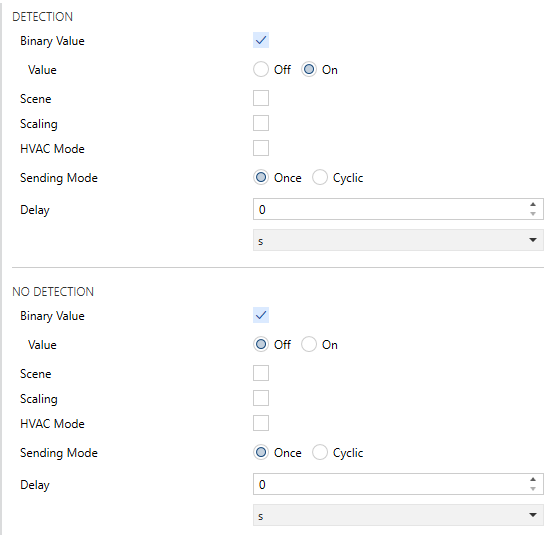
- Binary Value [enabled / disabled]: enables or disables the sending of a binary value (as set in Value [Off / On]) through object “[Ix] [Ci] Detection Status (Binary)”.
- Scene [enabled / disabled]: enables or disables the sending of a scene trigger value (as set in Value [1…64]) through object “[Ix] [Motion Detector] Scene Output”.
- Scaling [enabled / disabled]: enables or disables the sending of a percentage value (as set in Value [0…100]) through object “[Ix] [Ci] Detection Status (Scaling)”.
- HVAC Mode [enabled / disabled]: enables or disables the sending of an HVAC special-mode trigger value through object “[Ix] [Ci] Detection Status (HVAC)”. The desired HVAC mode can be set through parameter Value, which provides the following options:
| Modo HVAC | Valor del objeto |
|---|---|
| Confort | 1 |
| Standby | 2 |
| Economy | 3 |
| Building protection | 4 |
Table 1. HVAC Modes
- Sending Mode [Once / Cyclic]: if the latter is selected, the following field will also be shown:
- Period [1…5…255] [s] [1…255] [min] [1…18] [h].
- Delay [0…255] [s / min] [1…18] [h]: sets the time that the device should wait before sending the values to the bus, once the channel enters the Detection state.
Note
Please note that if this delay is greater than the Length of Detection, the sending associated with the detection will not occur.
2.1.1.3. Other configurations
While the channel remains disabled, any further sendings to the bus related to that channel will be interrupted, no matter if motion detections take place or not.
It is possible to restrict the behaviour of the channel according to the luminosity reading. In order to make use of this functionality, “Luminosity Measurement and Sending” must be enabled first for the corresponding channel.
Example: Luminosity-Constrained Detection
- A source of artificial light needs to be switched on or off depending on whether there is motion or not in the room and on the available sunlight. Thus, a Luminosity-Constrained Detection is configured, with a threshold value of 50% and with the “Send no detection when the threshold is exceeded” option active.
- 1) At night, the luminosity level stays at 10%.
- 2) Motion is detected at 6:00h am. The light source turns on as luminosity < 50%, causing a rapid increase of the luminosity, which keeps rising due to the sunrise.
- 3) Further motion is detected every few seconds, so the light source remains on.
- 4) At 6:30h, after the dawn, the luminosity level is already about 60%. Therefore, the artificial light source turns off (“No Detection” is sent as the threshold value has been exceeded) and therefore the level lowers to 55%.
- 5) The light source remains off no matter if there are still moving subjects in the room, as the luminosity is in any case over the threshold value.
- It becomes clear that the essence of this example (where “No Detection” has been configured to be sent after exceeding the threshold value) consists in setting a threshold value which is greater than the luminosity level provided by the natural sunlight (here, 55%) and in ensuring the artificial light source itself does not cause (during the absence of the sunlight) a luminosity level greater than such value, either.
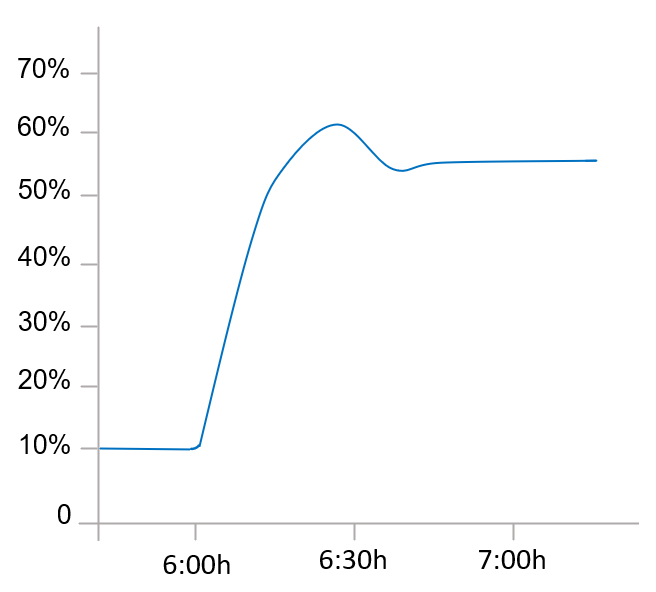
- Figure 8: Example of brightness evolution per hour
This threshold is also configurable via bus object ([IX][CX] Luminosity Threshold), so that the value can be changed with a telegram sending via KNX bus.
The already mentioned Reset Luminosity after No Detection function guarantees that, after a switch-off due to the sending of a no-detection, the device will notify any further detection in any case, even if it has not been able to verify the updated luminosity value yet. Please see the following examples.
Example: Luminosity Reset.
A light source needs to be turned on or off depending on the motion detection and on whether it is daytime or night.
Hence, a luminosity detection constrained to a threshold of 30% is configured, although “Send no detection when the threshold is exceeded” is disabled.
- If somebody enters the room at night, the light source will turn on, thus making the luminosity raise to 70%. Such value will be afterwards measured by the device. As the device was NOT set to send a “No Detection” after surpassing the threshold, the light source will remain on.
- After a while with no motion, the “No Detection” is sent, which turns the light off.
- If motion is again detected immediately after (before the device has had enough time to detect the darkness), the “Detection” will not be sent to the bus until the device can check the updated luminosity (see “Luminosity Measurement and Sending”, in 2.1).
- To prevent the above situation, it is possible to parameterise a luminosity reset to 0% after the “No Detection”.
- Example: Luminosity Reset (delayed).
Let the light source of the above example implement a soft (progressive) switch-off. As above, the switch-on and the switch-off are required to depend on the motion detection and on whether there is natural sunlight in the room or not.
Again, a threshold of 30% is configured, without a “No detection” sending after exceeding the threshold value.
- If somebody enters the room at night, the light source will turn on, making the luminosity raise to 70%. Such value will be afterwards measured by the device. As the device was NOT set to send a “No Detection” after surpassing the threshold, the light source will remain on.
- After a while with no motion, the “No Detection” is sent, making the progressive switch-off of the light source start.
- If Reset the luminosity after No Detection was set to “Yes”, the device will assume a luminosity of 0% from that moment. However, as no motion is being detected, the device will receive further luminosity values (e.g., 60%) during the progressive switch-off, thus overwriting that 0%.
- This may cause that a detection taking place before the end of the switch-off is not notified to the bus, as 60% > 30%. Therefore, the light will finally switch completely off, but the device will not be aware of the darkness until it receives, some instants later, the updated luminosity.
- To prevent the above situation, it is possible to impose a delay to the luminosity reset, so it remains at 0% once the progressive switch-off is over and therefore preventing that value from being overwritten.
Note
As stated in previous pages, the luminosity reset option only applies to transitions from the “Detection” to the “No Detection” states and when they are due to events of the sensor. Therefore, the luminosity is not reset in the following cases:
- After sending an extra “No Detection” due to exceeding the luminosity threshold (parameterisable behaviour).
- After sending a “No Detection” due to a transition from the “No Detection” state towards itself (i.e., if a detection had been reported by the sensor but the channel remained in the “No Detection” state because of a luminosity value greater than the threshold, the luminosity will not be reset even if “No Detection” is still reported to the bus).
Values received through this object will be interpreted by the device as a master detection or no-detection signal (i.e., this object permits externally overwriting the motion detection signal). The behaviour when a forced-state value is received from the bus is as follows:
- “ON” is received:
- If the channel was previously in the “Detection” state, no action will be taken.
- If the channel was previously in the “No Detection” state, it will enter the “Detection” state. The detection delay (see 2.1.1) will also apply here, analogously as when it is the actual sensor what triggers the “Detection” state.
- “OFF” is received:
- If the channel was previously in the “Detection” state, it will enter the “No Detection” state. The configured no-detection delay (see 2.1.1) will also apply here, analogously as when it is the actual sensor what triggers the “No Detection” state.
- If the channel was previously in the “No Detection state”, no action will be taken. The no detection delay that has been configured shall also apply in this case (see section 2.1.1), as well as when it is the sensor itself that reports the detection.
After forcing a state, the device remains under that state during a configurable time. Once this period expires:
- If the forced state was “No Detection”, the device will still remain under that state without performing any sending, until motion is detected again.
- If the forced state was “Detection”,
- If motion did not take place during the last T seconds (being T the detection time), the device will switch to “No Detection” and perform the corresponding sending, unless the channel is found locked.
- If there was any motion during the last T seconds (being T the detection time), the device will remain under “Detection”, without performing any sending to the bus.
Forced states have a higher priority over any other functionality and are executed unconditionally with independence of the lock state of the channel and of the state of the detector.
An object is available for the detection of external motion, so that other KNX devices can inform about motion detection and a joint response can be executed. When one “1” is received through this object, the channel will act the same way as if the sensor itself had detected motion: the detection object will be sent to the bus and the detection length will start counting.
Keep in mind that if the remote device is not configured to periodically re-send that “1” to this object, the local detection channel will leave the “Detection” state as soon as the detection length time expires.
ETS Parameterisation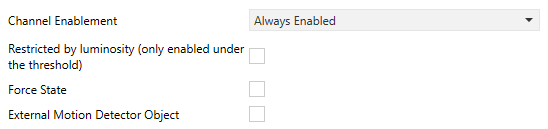
- Channel Enablement [Always Enabled / Enable using 1-bit object]: sets how to activate or deactivate the channel.
- Always Enabled: the channel will always remain active.
- Enable using 1-bit Object: the channel will switch from active to inactive (or vice versa) according to the value [0 = Enable; 1 = Disable / 0= Disable; 1 = Enable] received through the “[Ix][Ci] Enable Channel” object.

- Enable using a scene: the channel will switch between active to inactive according to the values received through the “[Motion Sensor] Scene Input” object.

Selecting this option also requires setting the following parameters:
- Scene to Enable [1…64]: sets the scene number that will activate the channel.
- Scene to Disable [1…2…64]: sets the scene number that will deactivate the channel.
If one of the control objects is enabled, the following parameters are displayed:
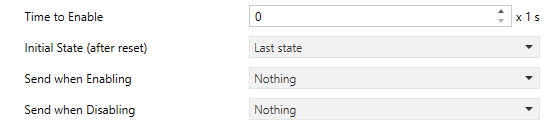
- Time to Enable [0…255]: sets a delay between the reception of the value and the actual re-activation (enablement) of the channel.
- Initial Status (after reset) [Last state / Enable / Disable]: sets whether the channel will be enabled or disabled at the device start-up or after a bus power failure. On the very first start-up, the last state is assumed as enable.
- Send when Enabling [Nothing / No Detection / Detection]: sets a value to be sent to the bus once the channel switches to the enabled state, to notify that the detection process is being resumed. The last two correspond respectively to the values (binary, scene, etc.) set for “Detection” and “No Detection”, as explained in 2.1.1.
- Send when Disabling [Nothing / No Detection / Detection]: analogous to the above parameter; sets the value to be sent to the bus when the channel becomes disabled.
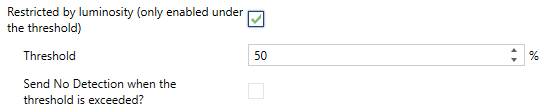
- Restricted by Luminosity [enabled / disabled]: for this object to appear, luminosity measurement and sending must be enabled. Once activated, the value corresponding to “Detection” will only be transmitted to the bus in case the luminosity level during the detection is lower than a certain threshold level. Enabling this option requires setting the following parameters as well.
- Threshold [0…50…100] [%] / [0…40…100] [x 10 lux]: luminosity value over which the channel will stop sending detections.
Note
The value corresponding to “No Detection” will always be sent, no matter if the luminosity level is over the threshold value or not.
- Send No Detection when the threshold is exceeded? [enabled / disabled]: if enabled, the “No Detection” value will be sent to the KNX bus as soon as the luminosity is found over the threshold value.
Note
Parameterising inadequate threshold values may cause an undesired behaviour of the device.
- Force state [enabled / disabled]: enables or disables the "[Ix][Ci] Force state" one-bit object.
- Idle Time after Force [1…10…255][s] [1…255][min] [1…18][h]: sets the time interval during which the channel will remain in the forced state. Note that forced states ignore the length of detection and blind time that may have been configured.
- External Motion Sensor Object [enabled / disabled]: enables or disables a specific communication object (“[Cx] External Motion Detection”) to receive motion detections from other KNX devices, so that several devices can combine their states and perform a joint response.
Note
One external detection object is provided per input configured as a motion detector. Therefore, it will affect all channels enabled for such input.
2.1.2. Presence Detection
Apart from the motion detection channels, it is possible to enable the presence detection function. The difference between motion and presence is important:
- The detection of motion does not necessarily imply presence of humans (there may be objects moving in the room).
- The non-detection of motion does not necessarily imply non-presence of humans (they may be sleeping, for example).
The domotic system can hardly deal with this distinction. However, it is possible to monitor subjects entering / leaving the room (and therefore determining whether there is human presence inside or not) by making use of a set of motion detectors (one of them acting as a master, and the others as slaves) and of state sensors at the doors of the room.
To better illustrate how this functionality works, a practical example has been included at the end of this section.
The occupancy detection entails combining several devices:
- Motion detectors (one as a master and the others as slaves),
- Door opening and closing sensors or indicators, for entrance and departure monitoring.
The device that incorporates the presence sensor module can either as a master detector or as a slave detector.
2.1.2.1. Master
The master detector will bring together the information received from the slaves (through object “[Ix] Presence: Slave Input”) and its own detections, and therefore determine whether there is presence (“Occupied”) or not (“Not Occupied”). The communication object “[Ix] Presence: Occupancy State (Master Output)” indicates the mentioned state.
The transitions between the two states will imply the sending of a certain value to the KNX bus, which is configured in parameters.
The presence detection algorithm itself works as follows:
- The room will begin in the “Not Occupied” state.
- When a door opening is received (through the trigger object) the “Occupied” state will be adopted (if not already active).
- When a door closing is received (through the trigger object):
- During a certain waiting time, the algorithm will ignore any motion detections reported either by the master or the slave detectors.
- Next, the master starts counting the listening time.
- If either the master itself or the slave detectors report motion, the “Occupied” state will be adopted (if not adopted already).
- If the listening time expires after none of the detectors has reported motion detection, the “Not Occupied” state will be adopted.
- From that moment, any motion detection will activate the “Occupied” state (if not already active).
Associating certain sendings (a binary value, a scene, a percentage value or an HVAC mode) for the transitions between the “Occupied” and “Not Occupied” states and vice versa is possible. A status object is also provided which will be sent whenever the occupancy state changes.
Occupancy detection can be enabled or disabled, analogously as in presence detection channels (see section 2.1.1), through the enablement and scene input communication objects.
While the presence detection remains disabled, it will ignore any event it may be related to, such as motion detections or receptions of the trigger object.
An extra sending of the aforementioned values (binary, scene, percentage or HVAC) can be performed during the transitions between the Enabled and Disabled, although this will not alter the value of the occupancy status object.
To prevent undesired detections of no-presence, it is possible to send the KNX bus an order to save the scene as soon as the trigger value is received, provided that the current presence state is “Occupied”. After the listening time, if no further detections have taken place, the presence detector will switch (as usual) to “Not Occupied” and send the bus the corresponding value.
In these circumstances, if motion is detected again without a new reception of the trigger value, then the above situation will be considered as a false “Not Occupied” detection (as there was still presence in the room). An order will be sent to play back the scene previously saved (this will make the room recover the state it had prior to sending “Not Occupied”) and the detector will switch back to “Occupied”.
Example: False “non-occupied” detections.
- Suppose a room with two people sleeping inside (state “Occupied”). If the false non-occupied detections are being ignored, when one of them leaves, the room will switch to “Not occupied”. Afterwards, when the other person makes a movement, the room will switch to “Occupied” and the corresponding order will be sent, so for example the lights will turn on. On the contrary, with this option in use, such action will not take place when the person in the room makes a movement, as the trigger value (i.e., the door being opened) has not been received again.
If parameterised, it will be possible to apply this false non-occupancy detection algorithm only when the room is sold. Independently, it will also be possible to parameterise a detection filter, so that after a time called “security time” has elapsed since the end of the listening time (when unoccupied), various detections are required in a time window for the false non-occupied detection scene to be sent.
Important
- In order to count the detections parameterised in the filter, those made by any detector parameterised in the device in question will be considered, i.e. the sum of the detections of the master and its slaves.
- If during the time X a detection is received by any detector, the filter will not be applied, and the false non-occupied detection scene will be sent immediately.
When the presence detector is configured as a “Master”, we have a number of additional settings compared to those we have when configuring it as a “Slave”.
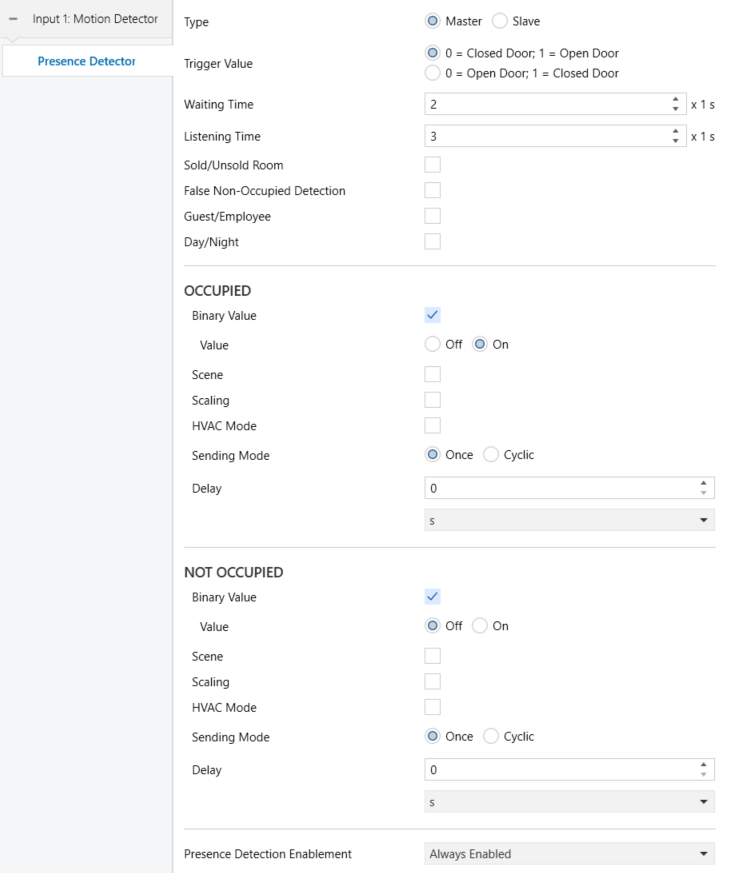
- Type [Master / Slave]: sets the detector as a master or a slave.
- Trigger Value [0 = Closed Door; 1 = Open Door / 0 = Open Door; 1 = Closed Door]: determines which values will indicate the door state, upon reception through the object “[Ix] Presence Trigger”.
- Waiting Time [0…2…65535] [x1 s] sets the waiting time before switching to No Occupancy, which is counted after the reception of the closed door trigger. This time can be modified through object “[Ix] Presence: Waiting Time”.
Note
The waiting times in all slave detectors must be greater than (or equal to) the waiting time of the master detector to ensure a proper behaviour.
- Listening Time [1…3…65535] [x1 s]: sets the value of the listening time, which starts counting once the waiting time expires. This can be overwritten in runtime by sending the new value to object “[Ix] Presence: Listening Time”.
- Sold/Unsold Room [enabled / disabled]: allows sending a different scene value for the first detection (only for guest). When this functionality is enabled the binary object “[Ix] Presence: Sold/Unsold Room” will be displayed. Through this object the status of the room must be received.
- Configuration [0 = Unsold; 1 = Sold / 0 = Sold; 1 = Unsold]: sets which value is associated with each of the options.
If this functionality is enabled, additional parameters for occupancy will be displayed.
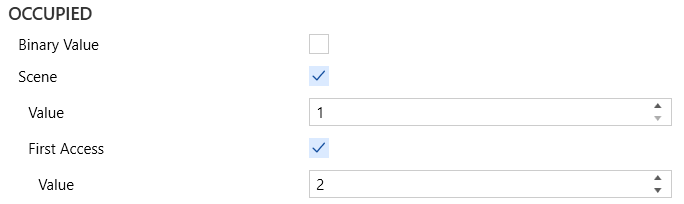
- First Access [enabled / disabled]: allows setting the scene value for the first access.
- Value [1…2…64]: scene value to be sent for the first access of a guest.
- False Non-Occupied Detection [enabled / disabled]: enables or disables the algorithm that prevents false detections of the Not Occupied state. If enabled, following parameters are displayed:
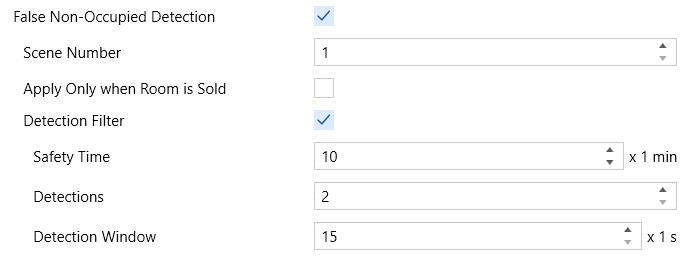
- Scene Number [1…64]: defines the scene number to be recorded and executed in case of False Non-Occupied Detection.
- Apply Only when Room is Sold [enabled / disabled]: this parameter only appears if “Sold/Unsold Room” enabled. By enabling this parameter, the False Non-Occupied Detection algorithm is only applied when the room state “sold” has been received through the corresponding object.
- Detection Filter [enabled / disabled]: enables or disables the filter for sending the False Non-Occupied Detection scene. If enabled, the objects “[Ix] Presence: Safety Time”, “[Ix] Presence: Number of Detections of the Filter” and “[Ix] Presence: Filter Detection Window” appear, allowing the filter to be modified without the need for programming. These objects correspond respectively to the following parameters:
- Safety Time [0…10…1440] [x1 min]: defines the time that must elapse from the end of the listening time (after changing to “not occupied”) until the filter starts to be applied. In case a detection is received before the end of this time, the filter will not be applied and a false non-occupied detection will occur directly.
- Detections [2…5]: number of detections needed for considering a false non-occupied detection.
- Detection Window [15…60] [x1 s]: time interval during which the number of parameterised detections must take place for considering a false non-occupied detection.
Notes
- In case of changing the number of detections or the duration of the detection window per object, the filter will be reset, but not the safety time.
- If the safety time is modified by object, it will be reset.
- If a bus failure occurs after the safety time has elapsed, when the bus voltage is restored, the safety time will not be restarted and the filter will be applied immediately.
- If a bus failure occurs during the safety time, it will be restarted when the bus voltage is restored.
- Guest/Employee [enabled / disabled]: allows different occupancy values to be sent depending on whether access is by a guest or an employee. When this functionality is enabled the occupancy parameters will be duplicated and the binary object “[Ix] Presence: Guest/Employee Access” will be displayed. Through this object the corresponding value to who is performing the access must be received.
- Configuration [0 = Guest; 1 = Employee / 0 = Employee; 1 = Guest]: sets which value is associated with each of the options.
- Day/Night [enabled / disabled]: brings the option to distinguish a daytime configuration and an overnight configuration for the sending to be performed during the transitions from “Occupied” to “Not Occupied” or vice versa. When enabled, the corresponding parameters will be duplicated, and the “[Ix] Presence: Day/Night” binary object will be added to the project topology, so the day/night transitions can be received.
- Configuration [0 = Day; 1 = Night / 0 = Night; 1 = Day]: sets which values will be associated with each of the options.
The functionality and configuration of the “Occupied” and “Not occupied” sections is entirely analogous as those already explained in section 2.1.1 but in this case the value will be sent through the object “[Ix] Presence State (Z)”, where “Z” depends on the send type selected (unless it has been set to “Scenes”; in that case, the value will be sent through “[Motion Detector] Scene Output”).
- Presence Detection Enablement: provides a procedure for temporarily disabling the presence detection function. The functionality and configuration are entirely analogous as those already explained in section 2.1.1

The above figure shows a scenario with two slave motion detectors, one master motion detector, two door sensors and one lamp, which is required to be controlled automatically, depending on the presence detection.
The involved objects for proper presence detection are:
- “[Ix] Presence: Slave Output”, from the device where the slave detector #1 is connected to.
- “[Ix] Presence: Slave Output”, from the device where the slave detector #2 is connected to
- “[Ix] Presence: Slave Input”, from the device where the master detector is connected to.
- “[Ix] Presence: Trigger”, from the device where the master detector is connected to.
- “[Ix] Presence: Trigger”, from the device where the slave detector #1 is connected to.
- “[Ix] Presence: Trigger”, from the device where the slave detector #2 is connected to.
- “[Ix] [Switch/Sensor] Edge” (or equivalent object), from the device where the left door sensor is connected to.
- “[Ix] [Switch/Sensor] Edge” (or equivalent object), from the device where the right door sensor is connected to.
- “[Ix] Presence State (Binary)”, from the device where the master detector is connected to.
- The on/off control object of the dimmer that controls the lamp.
One group address (A1) is required for objects A through C, another one (A2) for objects D through H, and another one (A3) for objects I and J.
In the above situation, the following sequence of events can be reproduced:
Being the room empty and therefore the presence detection in state “not-occupied”, the door on the left opens and somebody enters. The device where the left door sensor is connected to will send the trigger signal through A2 and it will be received by the slave detector no. 1 which afterwards will notify detection through A1.
The device where the master detector is connected to will receive both the trigger (A2) and the detection (A1) and therefore will activate the “occupied” state, which will make the lamp turn on (A3).
Another person enters the room through the door on the right side. The corresponding sensor and the slave detector no. 2 will react the same as above. However, since the presence detection in the device of the master detector was already in “occupied”, nothing will happen in the lamp.
Afterwards, one of the two people leaves the room (while the other person remains inside, in the central section of the room). Therefore, the trigger will be sent and then the two slaves will switch to “no-detection”.
As long as any of the detectors (master or slaves) keeps detecting motion, the “occupied” state will be maintained and therefore the lamp will not be switched off.
If the person that remains inside finally leaves the room (no matter through which door), the slave and master detectors will definitely remain in “no-detection”. After the listening time, the presence detection will change to “not-occupied”, so the lamp will be switched off.
Note
That if the person that remains in the room is sleeping when the other one leaves, the “not-occupied” state will be adopted. Therefore, any movement made afterwards by the person who is sleeping will activate back the “occupied” state, which will make the lamp turn on.
To prevent this, the False “Non-Occupied” Detection function can be activated. This way, when the first person leaves, an order will be sent to the bus to record the current scene, which will be played back (instead of turning the lamp on) when the person that was left sleeping makes a movement (i.e., when switching to “occupied” due to the detection of motion but without a previous trigger from the door sensors).
2.1.2.2. Slave
Slave detectors notify the master detector about detection situations by sending one “1”, through the “[Ix] Presence: Slave Output” object. Depending on the occupancy value given by the object “[Ix] Presence: Occupancy State” all detections made by slave detectors (when not occupied) or only the first one (when occupied) will be sent.
Slave detectors have the object “[Ex] Presence detection: occupancy status (master input)” which must be linked to the above-mentioned master object.
The only way a slave can switch from the detection state to the no-detection state is after the reception of a trigger signal (i.e., after a door closes). Therefore, slave detectors also make use of the “[Ix] Presence Trigger” object.
After the trigger signal is received, the slave will let a certain waiting time (configurable) elapse. The time count will be restarted if further triggers are received. When the count ends, the slave will switch to no-detection. Once in no detection, as soon as motion is detected the state will switch to detection.
ETS ParameterisationThe functionality and configuration of the parameters available when configuring the detector as a slave are analogous to those explained in section 2.1.2.1.
