Motion Detector: 1. Introduction
with Luminosity Sensor
1.1. Features
The motion detection functionality allows a motion sensor connected to a Zennio device equipped with inputs to notify of motion detection in the room where it is installed, thanks to its infrared technology.
In addition to the binary motion detection (yes / no), a function for measuring the luminosity has been incorporated, which makes it a very versatile accessory.
Finally, it brings the option to notify the KNX bus about errors in the connection or in the detector itself, through the Short-Circuit / Open Circuit functions.
Note
This functionality is also implemented in KNX-DALI gateways by Zennio (DALI BOX Interface 64 X2, DALI BOX Interface 64 v3 and inBOX DALI 16) through DALI-2 input devices.
1.2. Models and Supported Devices
The Zennio motion detectors are marketed as an optional accessory for the variety of Zennio devices equipped with inputs and whose application program is specifically compatible with these detectors.
The user manuals of the Zennio devices specifically make reference to this functionality, so please refer to them to confirm whether a particular device is compatible with the motion detector or not. Moreover, the behaviour and the options of the motion detection function may differ slightly depending on the Zennio device it is connected to. Therefore, the user manual of the motion detector has been particularised for each device. To access the documentation, it is highly recommended to make use of the links provided at the Zennio homepage (www.zennio.com) within the specific section of the particular device being configured.
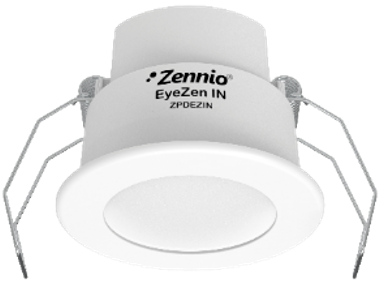
Zennio offers the EyeZen IN (ZPDEZIN) model for connecting to motion detector inputs.
Note
- On certain Zennio, not all of the features described below are implemented, such as the software brightness function. In those cases, the corresponding device user manual (available at www.zennio.com) will notify about it. Please note that the present user manual assumes it to be available, and therefore some options will not apply to certain devices.
- Most Zennio devices will operate with brightness in percentages. Sending brightness in lux will be specifically indicated in the manual of the device.