Binary Inputs: 2.2. Input X: Binary Input
Inputs configured as binary inputs let the device perform the following tasks:
- Retrieving the state (1/0) of the input line and detecting changes (i.e., button presses, sensor changes, etc.).
- Reporting the KNX bus about the above states/changes and triggering the corresponding actions, depending on the case.
- Detecting sabotage (i.e., unexpected voltage levels on the line) on inputs configured as switch/sensor.
Every binary input needs itself to be configured as a push button or a switch/sensor, in addition to the possibility to connect pulse generators and therefore configure the inputs as pulse counters.
A debounce suppression time may be set so that signal bounces are ignored for a certain period. In cases where the mechanics of switches cause signal bounce, this functionality may be useful to prevent unwanted behaviour, such as inaccuracy in pulse counting or incorrect edge or pulse detection.
It is possible to lock/unlock each input independently by writing to the proper objects. While an input remains locked, the application will ignore further switches that may take place on the line, however the periodical sending of values, if parameterised, will not be interrupted (the last value will still be re-sent, even if the input switches the state). On the other hand, when the unlock event occurs, a fresh evaluation of the current state of the input will be performed. If it differs from the state prior to the lock, it will be assumed that an edge has taken place and, therefore, the associated action will be activated.
ETS PARAMETERISATION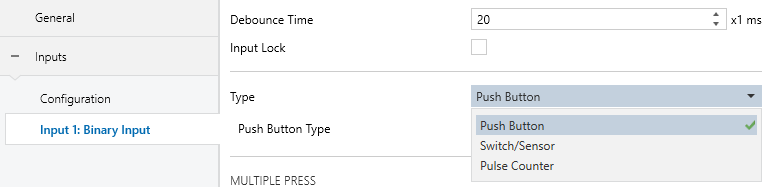
- Debounce Time [10…20…255] [x 1 ms]: time interval after a rising edge or a falling edge during which any further pulses in the input are ignored.
- Input Lock [enable / disable]: it allows locking or unlocking the input through an object. When the checkbox is enabled, the object “[Ix] Input Lock” appears.
- Type [Push Button / Switch/Sensor / Pulse Counter]: sets whether the input is a “Push button” (see section 2.2.1), a “Switch/sensor” (see section 2.2.2) or, in the case of the BIN devices, as a “Pulse Counter” (see section 2.2.3).
2.2.1. Push Button
The actions to be triggered on short, double, triple and long presses (and even on the release of the push button) are independent and parameterisable. It is even possible to set how long a press must be to be considered as long or how much time must elapse between two consecutive short presses to be considered as a multiple press.
Note
For an intermediate response to a single press, it is recommended not to configure any other types of presses, such as long or multiple presses.
For any type of press, it is possible to configure a delay before sending the value to the bus. In the case of binary values, a periodical sending can be configured, which may be useful when linking the value to an alarm monitor or similar device.
All type of presses shares the same actions to be parameterised. These can include sending a binary value to the KNX bus, controlling blinds, dimming lights, or issuing a command to run/save scenes. Additionally, it is possible to send a constant numerical value.
ETS PARAMETERISATIONWhen "Push button" is selected in Binary Input Type, these parameters are available:
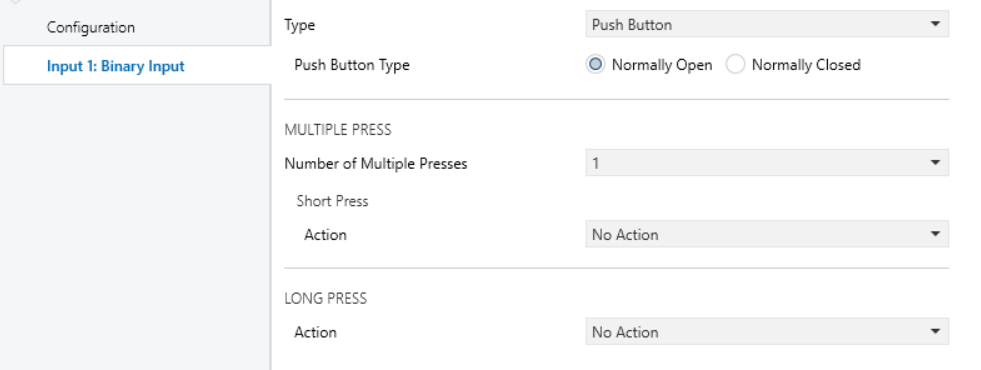
- Push Button Type [Normally Open / Normally Closed]: allows configure whether the push button is normally open or normally closed.
- Number of Multiple Presses [1 / 2 / 3]: allows double and triple presses to be enabled. When choosing 3 multiple presses, the long press disappears, as they are incompatible.
- Multiple Press
- Short Press. When an action other than “No Action” is assigned, the corresponding object for that action will appear with the header “[Ix] [Short Press]”
- Double Press. When an action other than “No Action” is assigned, the corresponding object for that action will appear with the header “[Ix] [Double Press]”
- Triple Press. When an action other than “No Action” is assigned, the corresponding object for that action will appear with the header “[Ix] [Triple Press]”
- Time Between Press [1 … 5 … 50] [x 0.1 s]: the time required between presses to be considered a multiple press. This option appears if a number of multiple presses greater than “1” is enabled.
Note
The longer this time, the longer the wait required to register a short press.
- Long Press. When an action other than “No Action” is assigned, the corresponding object for that action will appear with the header “[Ix] [Long Press]” in addition to the long press time parameter.
- Long Press Time [1…5…50] [x 0.1 s]: sets the minimum time that a press should last to consider it a long press.
- Action: Configures the action to be performed on receipt of corresponding type of pulse.
- No Action
- Sending of 0/1
- Shutter Control
- Dimmer Control
- Sending of a Scene
- 1-Byte Constant (Integer)
- 1-Byte Constant (Percentage)
- 2-Byte Constant (Integer)
- 2-Byte Constant (Float)
2.2.1.1. No Action
Does not perform of any action after pressing, equivalent to being disabled.

2.2.1.2. Sending of 0/1
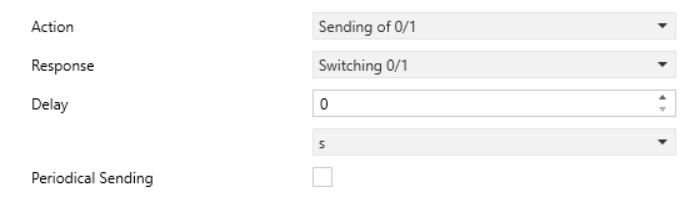
- Response [0 / 1 / Switching 0/1]: allows configuring the value to be sent by the communication object each time the press is detected. Depending on the selected response, a communication object shall appear with the pulse header and the response name.
- Delay [0 … 255] [s / min] [0 … 18] [h]: delay time from when the press is received at the input to when the value is sent via object to the bus.
- Periodical Sending [enabled / disabled]: allows the periodic transmission of the last value of the objects. When the checkbox is enabled, the following parameters appear:
- Response Sending [Always / Only for Value 0 / Only for Value 1] (only when the response is “Switching 0/1”) it can be configured whether the transmission should occur for one of the object’s values or for both.
- Sending Period [0 … 255] [s / min] [0 … 18] [h]: it allows setting the time to elapse between sendings.
2.2.1.3. Shutter Control
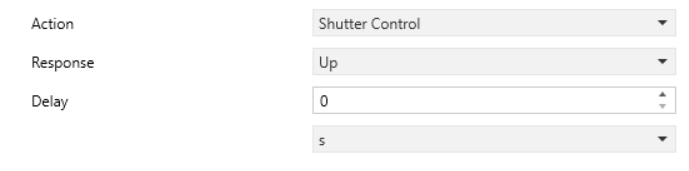
- Response [Up / Down / Up/Down (Switched) / Stop/Step Up / Stop/Step Down / Stop/Step (Switched)]: allows configuring the value to be sent by the communication object each time the press is detected. Depending on the selected response, a communication object shall appear with the pulse header and the response name. If “Up/Down (Switched)” response is selected, an object will appear which will receive the status of the shutter “[Ix] [X Press] Shutter Status (Input)”
- Delay [0 … 255] [s / min] [0 … 18] [h]: delay time from when the press is received at the input to when the value is sent via object to the bus.
2.2.1.4. Dimmer Control
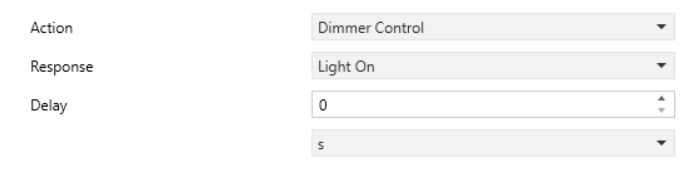
- Response [Light On / Light Off / Light On/Off (Switched) / Brighter / Darker / Brighter/Darker (Switched)]: allows configuring the value to be sent by the communication object each time the press is detected. Depending on the selected response, a communication object shall appear with the pulse header and the response name. If any response of increase or decrease lighting is selected, the setting of the dimming step appears:
- Dimming Step [1.56% / 3.12% / 6.25% / 12.5% / 25% / 50% / 100%]: light increment/decrement in each pulse.
- Delay [0 … 255] [s / min] [0 … 18] [h]: delay time from when the press is received at the input to when the value is sent via object to the bus.
2.2.1.5. Sending of a Scene
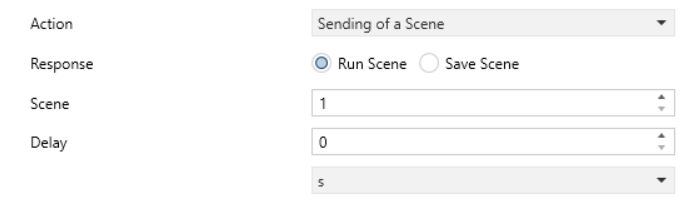
- Response [Run Scene / Save Scene]: sends the command to run or save the desired scene.
- Scene [1…64]: sets the desired scene number for the above run/save orders.
- Delay [0 … 255] [s / min] [0 … 18] [h]: delay time from when the press is received at the input to when the value is sent via object to the bus.
2.2.1.6. X-Byte Constant
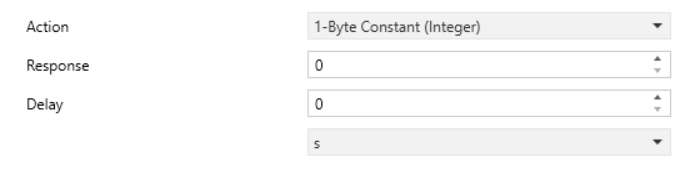
- Response: constant numeric value to send each time the press is received. Response according to the chosen action:
- 1-Byte Constant (Integer) [0 … 255]: sets a constant value to be sent to the bus (through “[Ix] [Short Press] Constant Value (Integer)”).
- 1-Byte Constant (Percentage) [0 … 100]: sets a constant value to be sent to the bus (through “[Ix] [Short Press] Constant Value (Percentage)”).
- 2-Byte Constant (Integer) [0 … 65535]: sets a constant value to be sent to the bus (through “[Ix] [Short Press] Constant Value (Integer)”).
- 2-Byte Constant (Float) [-671088.64 … 0 … 670433.28]: sets a constant value to be sent to the bus (through “[Ix] [Short Press] Constant Value (float)”).
2.2.2. Switch/Sensor
Binary values (configurable) will be sent to the bus whenever rising or falling edges are detected in the input line. A different action can be configured for each edge.
It is possible to introduce a certain delay prior to sending these values to the KNX bus – a delay for the “0” and a delay for the “1”, no matter which one is sent after which edge (rising / falling). Moreover, periodically re-sending the last value is possible by configuring the desired period.
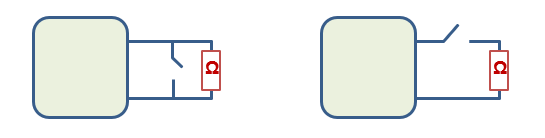
Security checks can optionally be performed for inputs of the Switch/Sensor type, as long as an end-of-line resistor has been connected to the switch/sensor. The value of such resistor needs to be configured by parameter (the available values are 2.2 kΩ, 2.7 kΩ, 3.3 kΩ, 4.7 kΩ and 10 kΩ) as well as whether it has been connected in parallel or serially, which depends on the switch/sensor type (normally open or normally closed).
- If normally open, the line will remain at a low voltage level in the absence of the undesired condition. The occurrence of that situation, however, will cause a rising edge (the switch/sensor gets closed). This type of sensor requires connecting the end-of-line resistor in parallel.
- On the other hand, if normally closed, the line remains at a high voltage level until the occurrence of the undesired situation, which will cause a falling edge (the switch/sensor will open). This requires connecting the end-of-line resistor in series.
By means of this resistor, it will be possible to distinguish not only the two states of the switch/sensor, but also additional (unexpected) voltage levels (e.g., short-circuits and open circuits due to a breakdown or a sabotage), which will be reported to the bus through alarm objects.
When “Switch/Sensor” is selected in Binary Input Type, the following parameters are available:
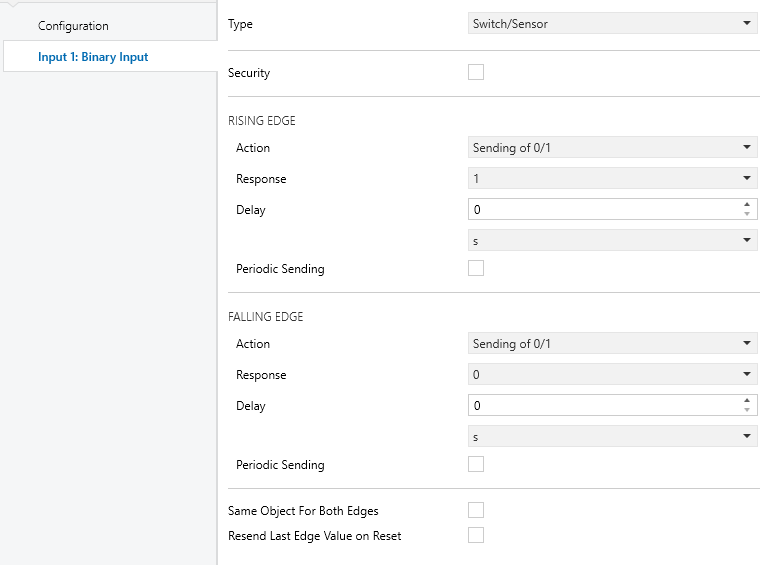
- Security [enabled / disabled] selecting or unselecting this checkbox determines whether the input line includes a security end-of-line resistor so it is therefore possible to monitor sabotage or breakdown situations (which will be notified by periodically sending the value “1” through object “[Ix] [Switch/Sensor] Alarm: Breakdown or Sabotage”; once they are over, this object will send one “0”). When selected, two more parameters show up:
- Switch/Sensor Type [N.O. (Parallel Resistor) / N.C. (Serial Resistor)]: sets whether the switch/sensor is normally open and therefore with a resistor connected in parallel or normally closed and therefore with a resistor connected in series.
- Resistor Value [2.2 kΩ / 2.7 kΩ / 3.3 kΩ / 4.7 kΩ / 10 kΩ]: sets the value of the resistor.
- Actions for Rising or Falling Edge. The value to be sent via the object “[Ix] [Switch/Sensor] [Rising/Falling Edge]” when a rising edge, falling edge, both or none are detected. It will have the same actions and delays as any press option of push button. For more information, see section 2.2.1.
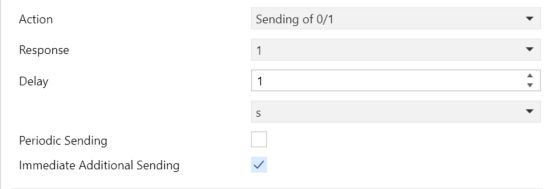
- If the action “Sending of 0/1” is configured and a delay above “0” is set, the following parameter appears:If
- Immediate Additional Sending [enabled / disabled]: enables an extra object with the same action configured for the edge. The transmission of this object occurs immediately after the edge is detected.
- Same Object for Both Edges [enabled / disabled]: it allows to have only one common object for transmissions from both edges.
- Resend Last Edge Action on Bus Voltage Recovery [enabled / disabled]: sets if the status of the input (i.e., the action that corresponds to the fact of switching to that state) should always be sent to the bus when the device recovers from a power loss, even if the status is the same as before the power loss. When this option is enabled, a configurable delay for the retransmission appears:
- Sending Delay [2 … 255] [x 1 s]: delay time from the return of the bus voltage until the value of the object is sent.
2.2.3. Pulse Counter
The pulse counter function consists in counting the number of edges detected in the input. It is possible to select the edge type to be counted and the counter size. Moreover, depending on the configuration, the sending to the KNX bus can take place periodically, when the value changes or once a certain target value is reached. The current value of the counter can be reset to zero any time (provided that the input is not locked) through a specific binary object.
ETS PARAMETERISATIONWhen “Pulse Counter” is selected in Binary Input Type the following parameters are available:
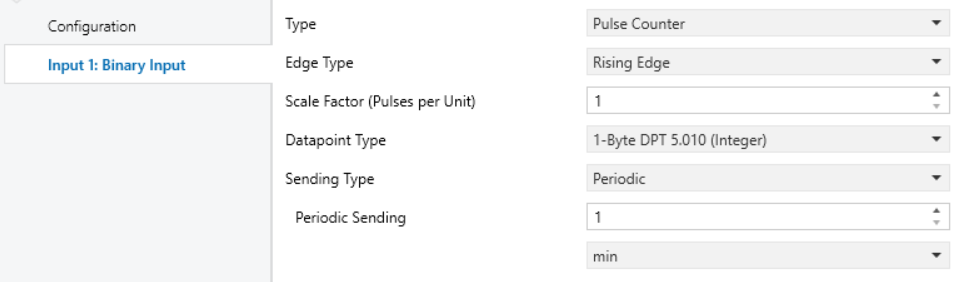
- Edge Type [Rising Edge / Falling Edge / Rising and Falling Edge]: sets the event type that must update the counter value.
- Scale Factor (Pulses per Unit) [1 … 65535]: determines the pulses per unit will the counter increase
- Datapoint Type: sets the maximum size of the counter output object counter.
- [1-Bit DPT 1.016 Send 1].
- [1-Byte DPT 5.010 (Integer)].
- [2-Byte DPT 7.001 (Integer)].
- [2-Byte DPT 9.024 Power (kW)].
- [2-Byte DPT 9.025 Flow (l/h)].
- [4-Byte DPT 12.001 (Integer)].
- [4-Byte DPT 13.002 Flow Rate (m3/h)].
- [4-Byte DPT 13.010 Energy (W/h)].
- [4-Byte DPT 13.013 Energy (kW/h)].
- [4-Byte DPT 14.056 Power (W)].
- [4-Byte DPT 14.076 Volume (m3)].
- Sending Type: sets when the counter value should be sent to the bus, through the “[Ix] [Pulse Counter] Counter” object.
- [Periodic]: the object will be sent cyclically. The period must be configured in Periodical Sending [1 … 255] [s / min] [1 … 18] [h].
- [Value Change]: the object will be sent every time the value changes.
- [Target Value]: sending shall take place when the value of the counter reaches a parametrised value, then the count shall be reset from zero. The value to be reached shall be configured by means of parameter Final Value.
- [0 … 255] for 1-Byte (Integer).
- [0 … 65 535] for 2-Byte (Integer).
- [0 … 670 434] for Power (kW) y Flow (l/h).
- [0 … 2 147 483 647] for Flow Rate (m3/h), Energy (Wh) y Energy (kWh).
- [0 … 4 294 967 295] for 4-Byte (Integer), Power (W) y Volume (m3).
Note
The values indicated correspond to the 1-Byte, 2-Byte and 4-Byte data types. The 1-Bit data type only sends “1” and the ranges do not change with size, so that all 2-Byte and 4-Byte data types have the same range for final value.