Traduction en cours. Ce manuel est affiché en anglais en attendant sa version française.IP Router: 2. Configuration
2.1. General - IP Router
After importing the corresponding database into ETS and adding the device to the topology of the desired project, the configuration process begins by assigning an individual address X.Y.Z. Depending on the use of the device, the configuration will be as follows:
- Area coupler: it must have individual address X.0.0.
- Line coupler: it must have individual address X.Y.0.
- Segment coupler: it must have individual address X.Y.Z.
The “General” tab (Figure 1) contains the following parameters:
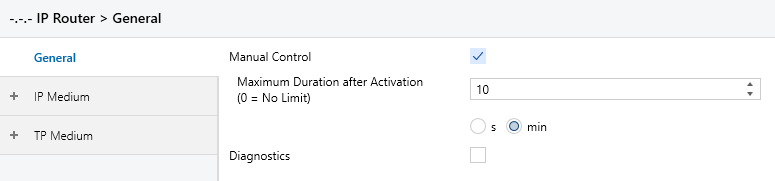
- Manual Control [disabled / enabled]: prevents or allows the use of the “Pass IA/GA” button (see section 1.4).
- Maximum Duration after Activation (0 = No Limit) [0…10…60] [min] / [0…600…3600] [s]: maximum time during which the Pass IA or Pass GA functionality remains active after its activation. The functionality can be deactivated before this time by pressing the button again.
- Diagnostics: enables the “Diagnostics” tab (see section 2.1.1).
2.1.1. Diagnostics
From this tab (Figure 2) it is possible to check the status of the tunnelling addresses of the device: which ones are in use and the IP address of the client connected to each one.
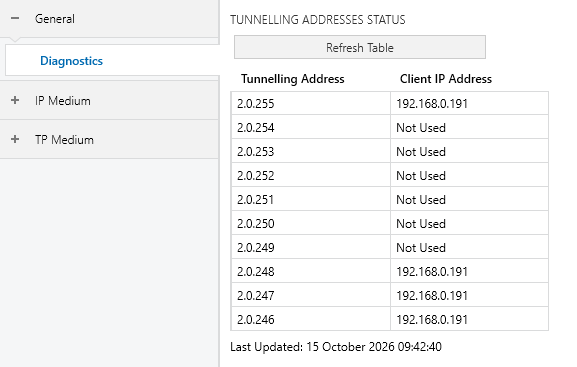
The information is not updated in real time: the “Refresh Table” button must be pressed to read it from the device. The data read is saved in the ETS project, so the date and time of the last update are shown, in the regional format of the PC.
2.2. IP Medium
The IP medium tabs determine the behaviour of the IP Router with the telegrams received from the IP network (main line).
2.2.1. Received Telegrams (IP Medium)
For telegrams received from the IP medium, there are three possible routing configurations:
- Block: the telegram never passes to the TP medium.
- Route: the telegram always passes to the TP medium.
- Filter: whether the telegram passes to the TP medium depends on its destination, as detailed for each parameter.
Note
The restrictions are added to those of Security Proxy. If routing is set to “Block”, all telegrams are blocked and the Security Proxy exceptions no longer take effect. If routing is set to “Filter” / “Route”, in order to communicate with a device blocked by Security Proxy, ETS must activate a temporary exception of 60 seconds (renewed automatically every ~50 s during programming).
The available parameters are shown in Figure 3.
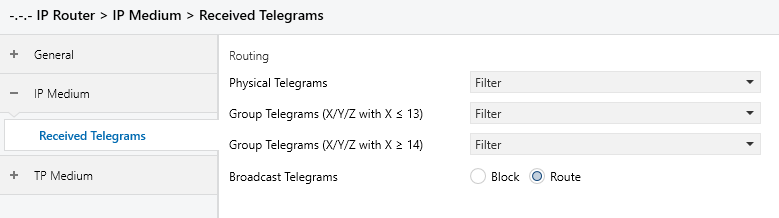
- Physical Telegrams [Block / Route / Filter]: telegrams addressed to an individual address, such as those sent while programming a device. With “Filter”, the telegram is only routed if the recipient is located on the TP medium.
- Group Telegrams (X/Y/Z with X ≤ 13) [Block / Route / Filter]: group telegrams whose main group is 13 or lower. With “Filter”, the telegram is only routed if at least one device on the TP medium uses that group address (see chapter 3).
- Group Telegrams (X/Y/Z with X ≥ 14) [Block / Route / Filter]: same as the previous one, for telegrams whose main group is 14 or higher.
- Broadcast Telegrams [Block / Route].
Note
Telegrams addressed to the IP Router itself are always accepted and never routed to the other medium, regardless of this configuration.
There are no telegram acknowledgement options on the IP medium.
2.3. TP Medium
The TP medium tabs determine the behaviour of the IP Router with the telegrams received and sent on the TP line (secondary line).
2.3.1. Received Telegrams (TP Medium)
Routing follows the same logic as in section 2.2.1, but in the opposite direction: it determines which telegrams pass from the TP medium to the IP medium (Figure 4).
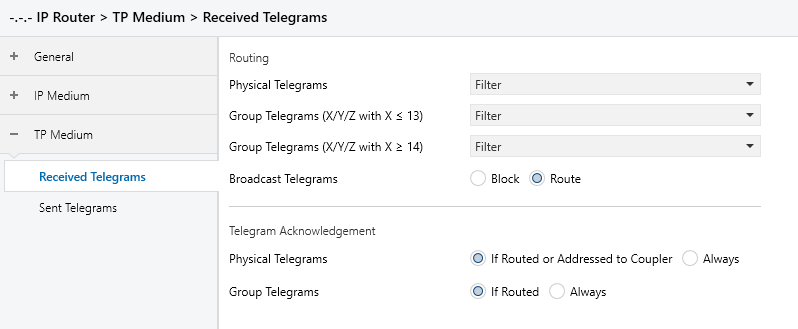
- Physical Telegrams [Block / Route / Filter].
- Group Telegrams (X/Y/Z with X ≤ 13) [Block / Route / Filter].
- Group Telegrams (X/Y/Z with X ≥ 14) [Block / Route / Filter].
- Broadcast Telegrams [Block / Route].
- Physical Telegrams [If Routed or Addressed to Coupler / Always]: determines in which cases the device acknowledges a physical telegram received from the TP medium.
- Group Telegrams [If Routed / Always]: determines in which cases the device acknowledges a group telegram received from the TP medium.
Note
The “Always” option makes the telegram appear as acknowledged (avoiding repetitions in the case of faulty projects, etc.) even if no device has received it. In the event of a reception error, the NACKs sent by the devices overwrite this acknowledgement, so no data is lost.
Note
While any tunnelling connection is open, the device always acknowledges the group telegrams received from the TP medium, as they can be captured by the tunnelling client.
2.3.2. Sent Telegrams
This tab (Figure 5) determines the behaviour of the IP Router when sending telegrams coming from the IP medium to the TP line. It is possible to select which telegrams are repeated if no acknowledgement has been received or a NACK / BUSY has been received.
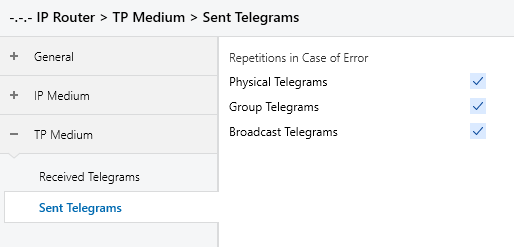
- Physical Telegrams [disabled / enabled].
- Group Telegrams [disabled / enabled].
- Broadcast Telegrams [disabled / enabled].
Note
This configuration does not apply to the responses of the device itself to telegrams addressed to it.
Note
With repetitions enabled, the device may dynamically suppress unnecessary repetitions in tunnelling connections to avoid overloading the bus.